> ## Documentation Index
> Fetch the complete documentation index at: https://help.voxdash.com/llms.txt
> Use this file to discover all available pages before exploring further.
# Public Level Access Control
> In the Data Project section, you can manage public access settings to control how your project is shared. The Public Access settings can be found in the…
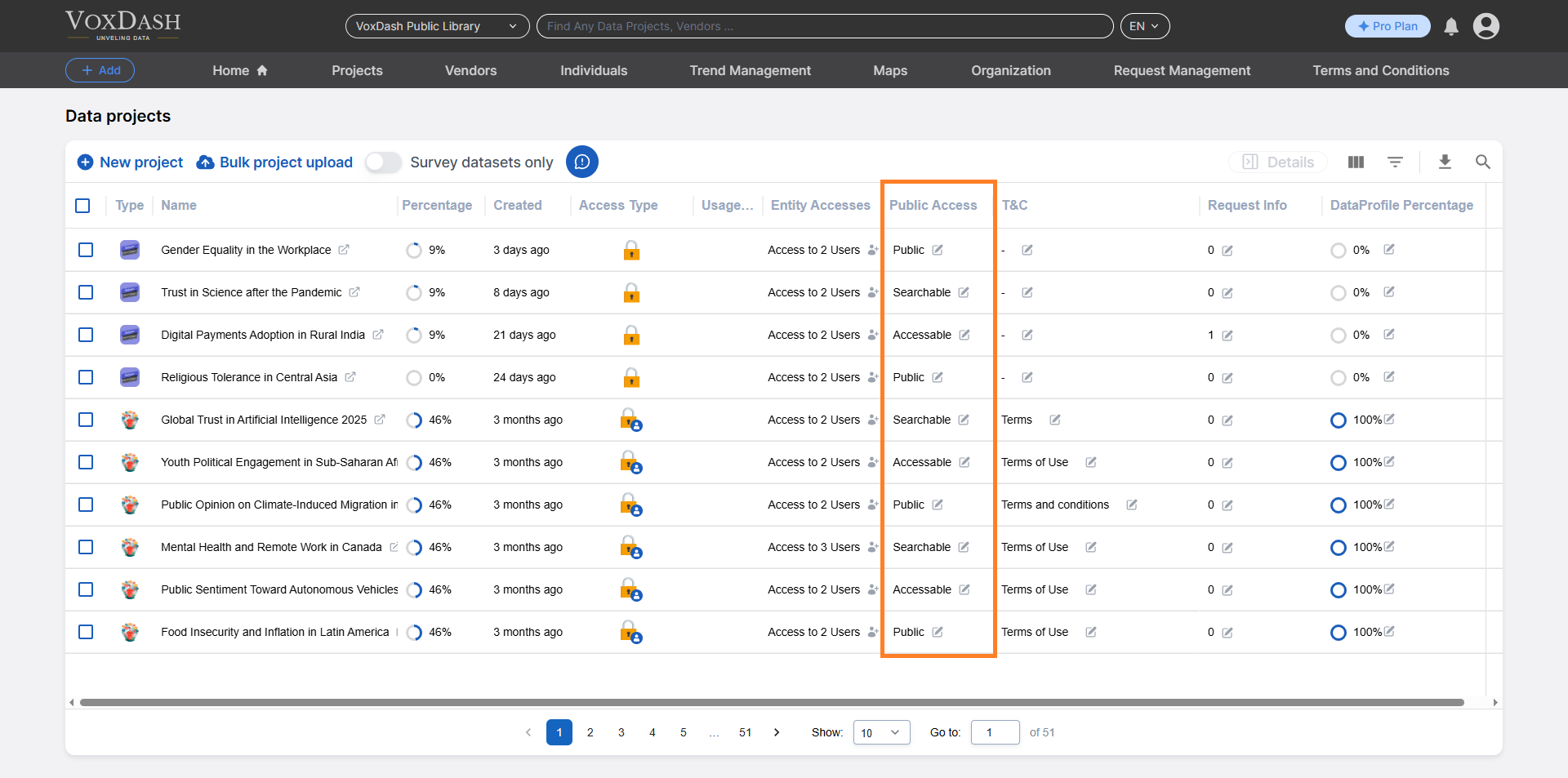
In the [Data Project](https://dataprovider.voxdash.com/projects) section, you can manage public access settings to control how your project is shared. The **Public Access** settings can be found in the ninth column of the Data Project page.
 ## **Steps to Enable or Edit Public Access:**
1.**Locate the Public Access Column**\
Go to the [Data Project](https://dataprovider.voxdash.com/projects) page and find the **Public Access** column (it is the ninth column from the left).
2.**Open the Editing Menu.**\
Click on the **arrow icon** next to the **Public Access** entry. This will open the editing menu, where you can adjust the access settings.
3.**Select Public Access Options**\
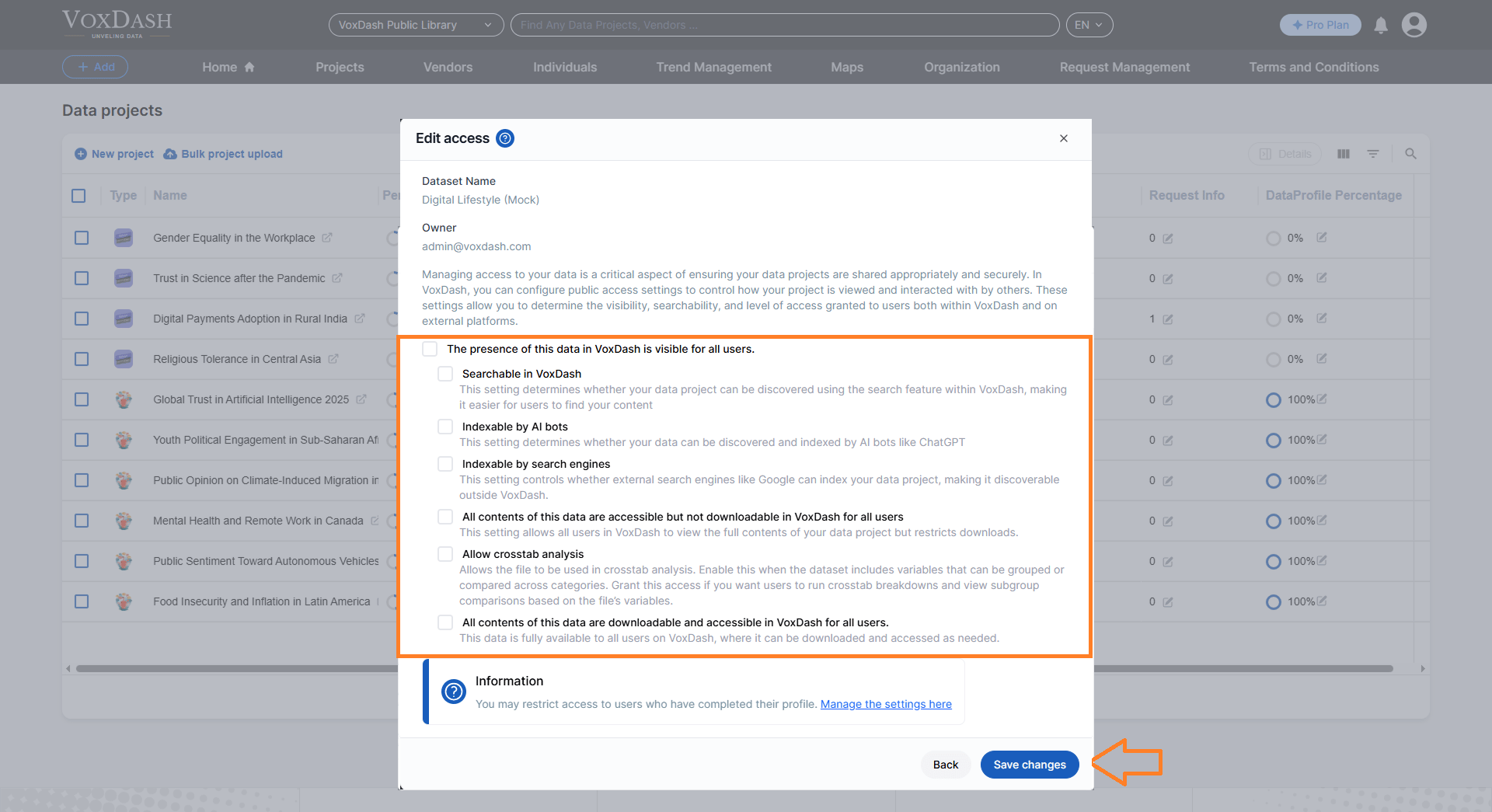
In the editing menu, tick the checkboxes corresponding to the desired **public access** options for your project. These options determine the level and type of access granted to the public.
4.**Save Your Changes**\
Once you've selected the appropriate options, click the **Save Changes** button located in the bottom-right corner (the blue button) to apply your settings.
## **Steps to Enable or Edit Public Access:**
1.**Locate the Public Access Column**\
Go to the [Data Project](https://dataprovider.voxdash.com/projects) page and find the **Public Access** column (it is the ninth column from the left).
2.**Open the Editing Menu.**\
Click on the **arrow icon** next to the **Public Access** entry. This will open the editing menu, where you can adjust the access settings.
3.**Select Public Access Options**\
In the editing menu, tick the checkboxes corresponding to the desired **public access** options for your project. These options determine the level and type of access granted to the public.
4.**Save Your Changes**\
Once you've selected the appropriate options, click the **Save Changes** button located in the bottom-right corner (the blue button) to apply your settings.
 ## **Public Access Levels**
The public access levels you configure affect how your data is shared and interacted with on VoxDash. These levels apply to all visitors, not specific users. The options include:
* **Public or Private**: Determines whether the presence of the data in VoxDash is visible to all users.
* **Searchable in VoxDash**: Controls whether the data can be found using the VoxDash search feature.
* **Indexable in Search Engines**: Allows or restricts external search engines (like Google) from indexing the data.
* **Content Access**: Specifies whether all data content is viewable but not downloadable by all users in VoxDash. This option is only available if your file type is supported by VoxDash for this feature.
* **Downloadable Content**: Determines if the data is both viewable and downloadable by all users in VoxDash.
* **Indexable in AI**: Allows or restricts AI bots (like ChatGPT) from indexing the data.
* **Allow Crosstab Analysis**: Allows the file to be used in crosstab analysis. Enable this when the dataset includes variables that can be grouped or compared across categories. Grant this access if you want users to run crosstab breakdowns and view subgroup comparisons based on the file’s variables.
## **Additional Information**
### **Impact of Public Access**
When enabling Public Access, carefully consider the type of data being shared. Public access is ideal for open data initiatives, public reports, or collaborative projects where wide accessibility is a priority. For proprietary or sensitive data, opt for restricted access or user-based permissions to safeguard confidentiality.
### **Audit and Manage Public Access**
You can revisit and adjust public access settings at any time by following the steps outlined above. Regularly review these settings to ensure they comply with your current security and sharing requirements.
### **Who Can Edit Public Access?**
Editing public access settings is typically restricted to users with **administrative privileges** or specific **project permissions**. If you do not see the editing options, reach out to your **project administrator** for assistance.
By following this guide and understanding the various public access options, you can effectively manage the visibility, security, and accessibility of your data projects. Adjust the settings to align with your sharing needs and privacy policies, ensuring optimal control over your project’s exposure.
## **Public Access Levels**
The public access levels you configure affect how your data is shared and interacted with on VoxDash. These levels apply to all visitors, not specific users. The options include:
* **Public or Private**: Determines whether the presence of the data in VoxDash is visible to all users.
* **Searchable in VoxDash**: Controls whether the data can be found using the VoxDash search feature.
* **Indexable in Search Engines**: Allows or restricts external search engines (like Google) from indexing the data.
* **Content Access**: Specifies whether all data content is viewable but not downloadable by all users in VoxDash. This option is only available if your file type is supported by VoxDash for this feature.
* **Downloadable Content**: Determines if the data is both viewable and downloadable by all users in VoxDash.
* **Indexable in AI**: Allows or restricts AI bots (like ChatGPT) from indexing the data.
* **Allow Crosstab Analysis**: Allows the file to be used in crosstab analysis. Enable this when the dataset includes variables that can be grouped or compared across categories. Grant this access if you want users to run crosstab breakdowns and view subgroup comparisons based on the file’s variables.
## **Additional Information**
### **Impact of Public Access**
When enabling Public Access, carefully consider the type of data being shared. Public access is ideal for open data initiatives, public reports, or collaborative projects where wide accessibility is a priority. For proprietary or sensitive data, opt for restricted access or user-based permissions to safeguard confidentiality.
### **Audit and Manage Public Access**
You can revisit and adjust public access settings at any time by following the steps outlined above. Regularly review these settings to ensure they comply with your current security and sharing requirements.
### **Who Can Edit Public Access?**
Editing public access settings is typically restricted to users with **administrative privileges** or specific **project permissions**. If you do not see the editing options, reach out to your **project administrator** for assistance.
By following this guide and understanding the various public access options, you can effectively manage the visibility, security, and accessibility of your data projects. Adjust the settings to align with your sharing needs and privacy policies, ensuring optimal control over your project’s exposure.