Documentation Index
Fetch the complete documentation index at: https://help.voxdash.com/llms.txt
Use this file to discover all available pages before exploring further.
Editor Panel Overview
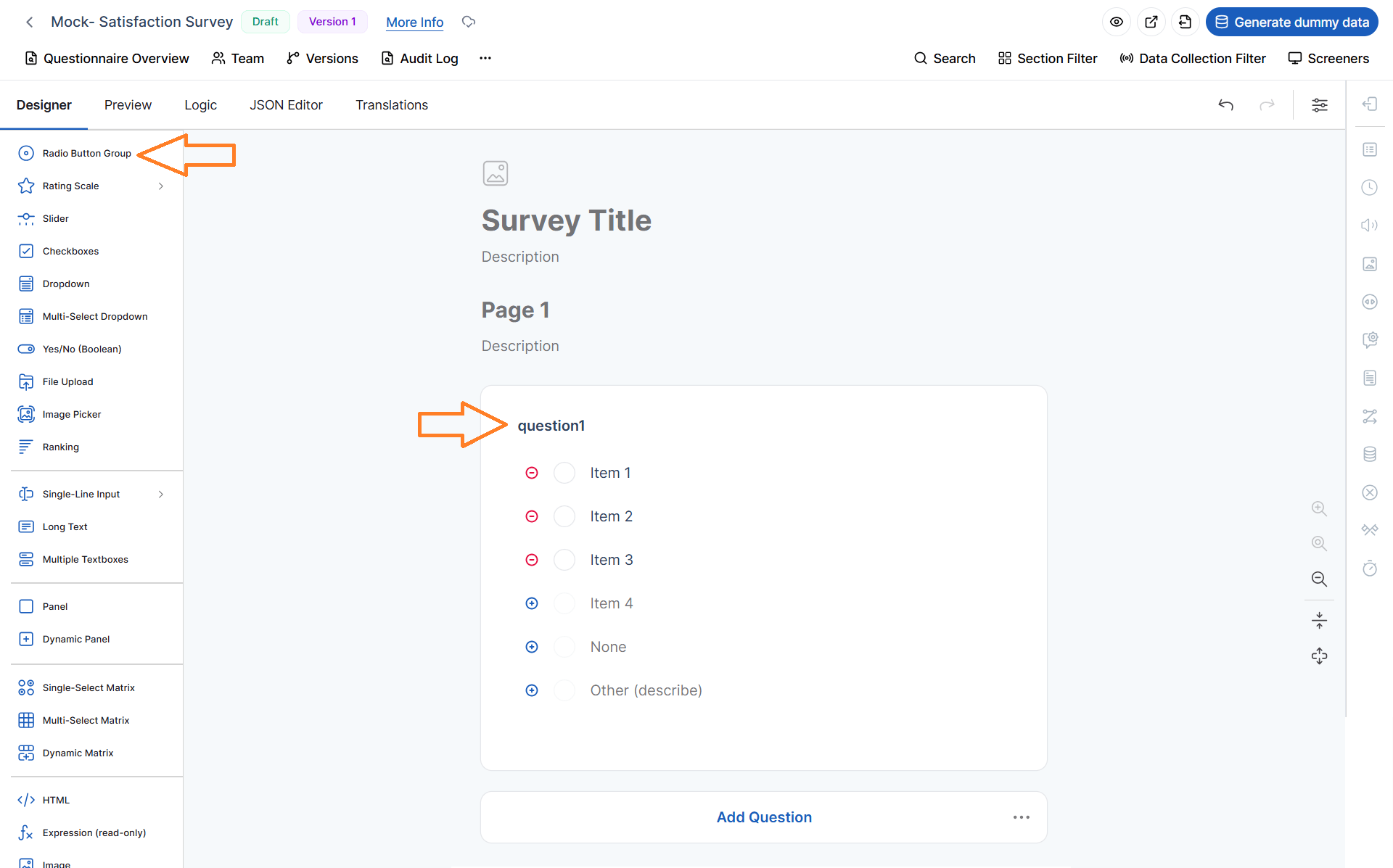
After creating a questionnaire—either manually or by uploading a file—you will be automatically navigated to the Editor Panel.
This page is where you design, manage, and refine the questions in your survey. It serves as the central workspace for building questionnaires tailored to your data analytics and eCommerce needs.
On the left side of the screen, you will find a panel that lists all available question types. These question types allow you to collect different kinds of data, from simple responses to more complex structured inputs.
At the top of this panel, you can use the search icon to quickly locate a specific question type.
Available Question Types
Below is a description of each question type and when to use it:
Useful when you want respondents to select only one option from a list. Ideal for mutually exclusive choices such as “Choose your preferred payment method.”
2. Rating Scale (labels, stars, smiles)
Useful for measuring opinions, satisfaction, or experience levels. Commonly used for product reviews or customer satisfaction surveys.
3. Slider
Useful when you want users to select a value within a continuous range, such as rating from 0 to 100 or setting a preference level.
4. Checkboxes
Useful when respondents can select multiple options from a list. Ideal for questions like “Which features do you use?”
5. Dropdown
Useful for presenting a single-select list in a compact format, especially when there are many options.
6. Multi-select Dropdown
Useful when users need to select multiple items from a dropdown list while saving screen space.
7. Yes / No (Boolean)
Useful for binary decisions, such as confirming agreement or eligibility.
8. File Upload
Useful when you need respondents to submit files, such as documents, images, or receipts (e.g., proof of purchase).
9. Image Picker
Useful for allowing users to select an option visually using images instead of text. Common in product preference surveys.
10. Ranking
Useful when you want respondents to order items by preference or importance, such as ranking product features.
Useful for collecting short text responses, such as names, email addresses, or brief answers.
12. Long Text
Useful for collecting detailed, open-ended responses, such as feedback or suggestions.
13. Multiple Textboxes
Useful when collecting multiple related inputs in one question, such as entering several contact details.
14. Panel
Useful for grouping related questions into a single section for better organization and readability.
15. Dynamic Panel
Useful when respondents need to repeat a group of questions multiple times, such as entering multiple products or entries.
16. Single-select Matrix
Useful for collecting responses across multiple items with a single choice per row, such as rating several services.
17. Multi-select Matrix
Useful when respondents can select multiple options per row in a structured table format.
18. Dynamic Matrix
Useful for collecting tabular data with flexible rows, where users can dynamically add entries (e.g., listing purchased items).
19. HTML
Useful for adding custom content, such as instructions, formatting, or embedded media within the survey.
20. Expressions (Read-only)
Useful for displaying calculated or dynamic values based on user input. These fields are not editable by respondents.
21. Image
Useful for displaying static images within the questionnaire to provide context or visual guidance.
22. Signature
Useful for capturing a digital signature, often required for confirmations, agreements, or approvals.
This panel gives you the flexibility to design highly customized surveys that align with your data collection goals, whether for customer insights, product feedback, or operational analytics.