> ## Documentation Index
> Fetch the complete documentation index at: https://help.voxdash.com/llms.txt
> Use this file to discover all available pages before exploring further.
# Search and Filter Questions
As questionnaires grow in size and complexity, locating specific questions can become more challenging. The **Search and Filter** tools help you quickly find questions based on their content, type, tags, language, or other metadata.
These tools are available at the top of the **Editor Panel** and allow you to navigate large questionnaires more efficiently without manually scrolling through every question.
## Search Options
The toolbar at the top of the page includes several search and filtering options.
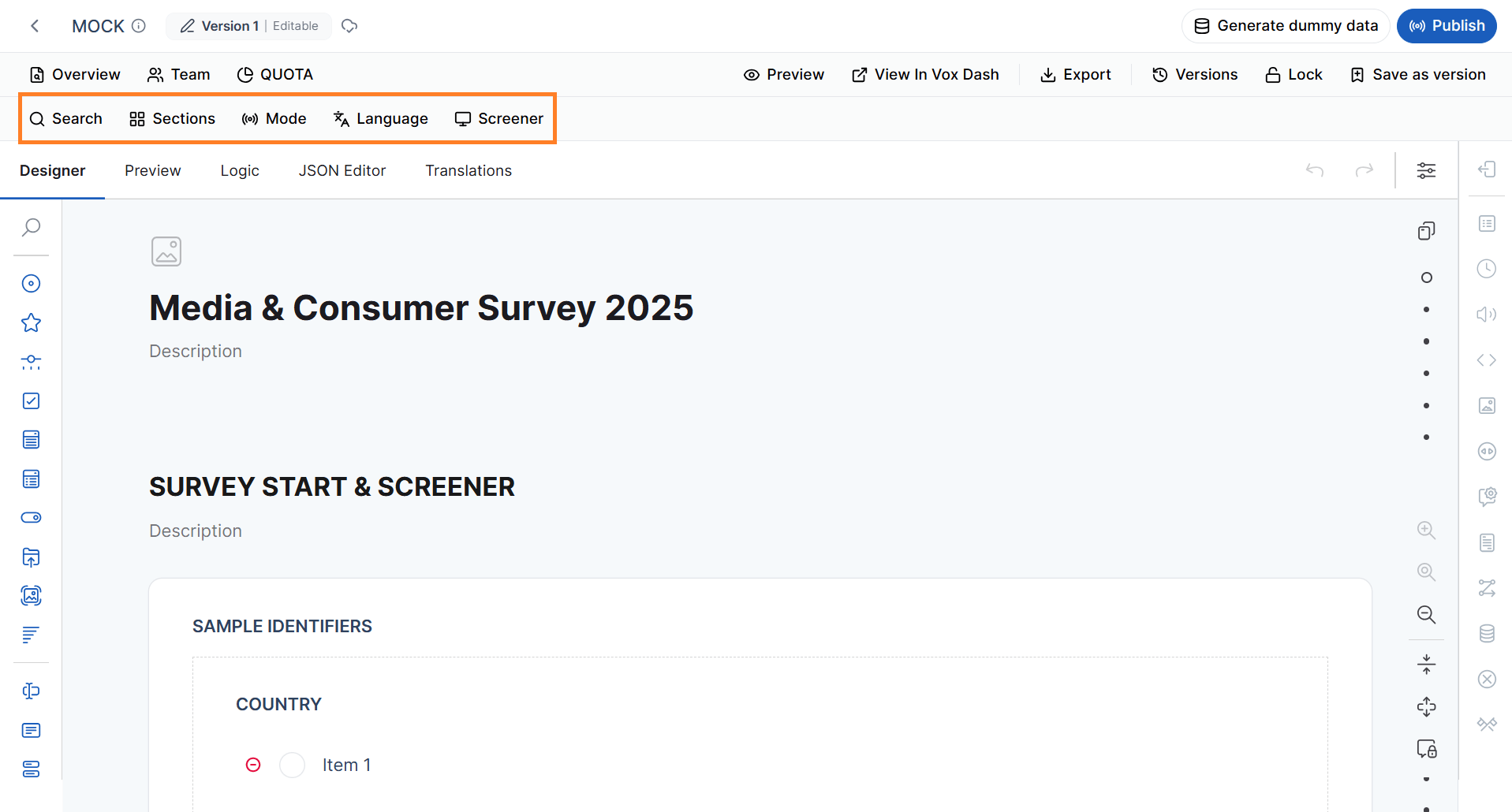 ### Search
The **Search** box allows you to quickly locate individual questions within the questionnaire.
You can search by:
* **Question ID** (for example, `Q1`, `Q25`, or another unique identifier)
* **Question title** or any text contained in the question title
### Search
The **Search** box allows you to quickly locate individual questions within the questionnaire.
You can search by:
* **Question ID** (for example, `Q1`, `Q25`, or another unique identifier)
* **Question title** or any text contained in the question title
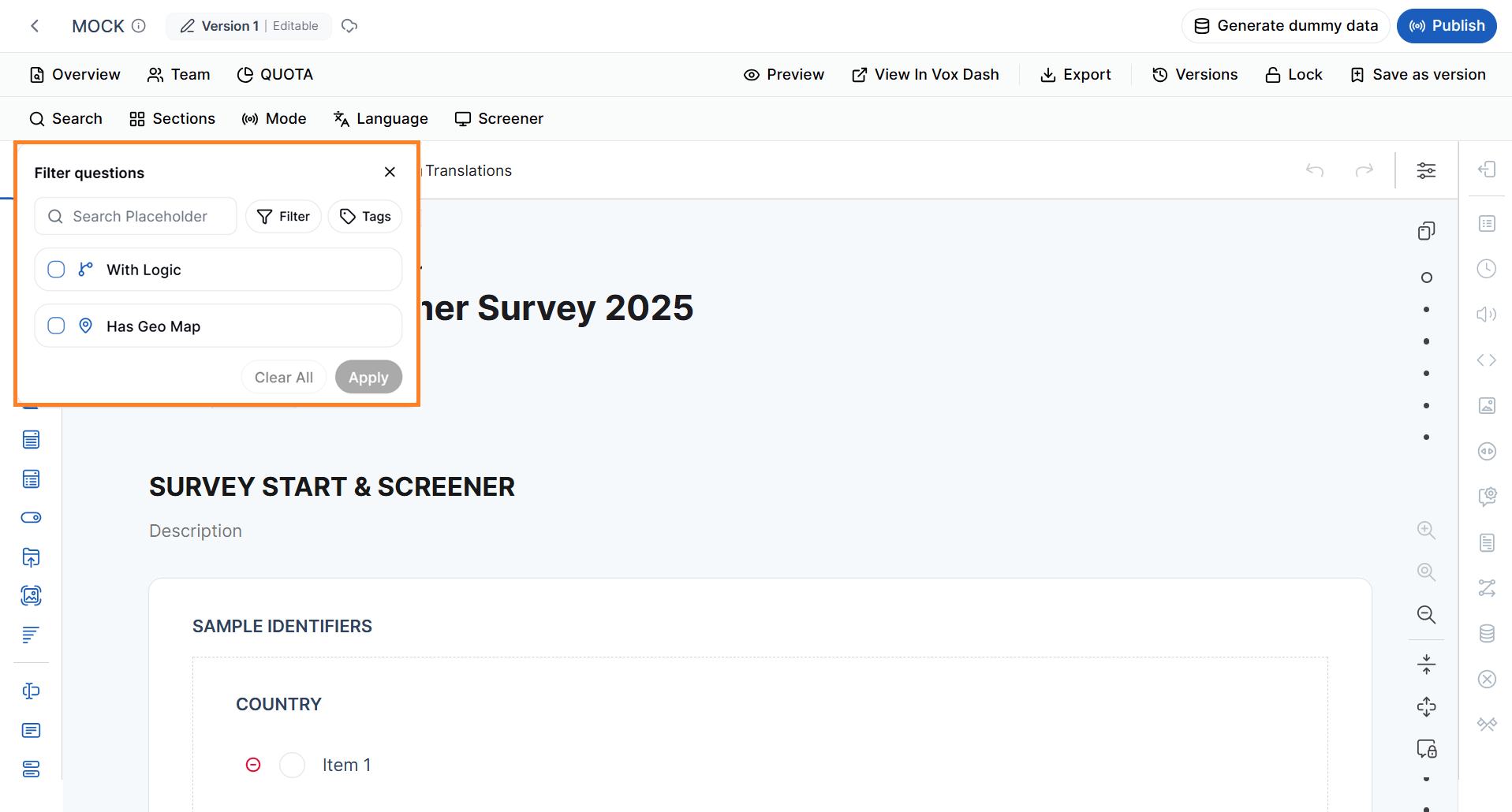 As you type, matching questions are automatically displayed, making it easy to jump directly to the desired question.
This feature is particularly useful when working with questionnaires that contain a large number of questions.
### Advanced Search Filters
In addition to searching by question title or ID, the Search panel provides several advanced filtering options.
#### Search by Question Type Filter
You can filter questions based on their question type.
For example, you can display only:
* Radio Button questions
* Checkboxes
* Dropdowns
* Rating Scales
* Matrices
* Panels
* Dynamic Panels
* File Upload questions
* HTML elements
As you type, matching questions are automatically displayed, making it easy to jump directly to the desired question.
This feature is particularly useful when working with questionnaires that contain a large number of questions.
### Advanced Search Filters
In addition to searching by question title or ID, the Search panel provides several advanced filtering options.
#### Search by Question Type Filter
You can filter questions based on their question type.
For example, you can display only:
* Radio Button questions
* Checkboxes
* Dropdowns
* Rating Scales
* Matrices
* Panels
* Dynamic Panels
* File Upload questions
* HTML elements
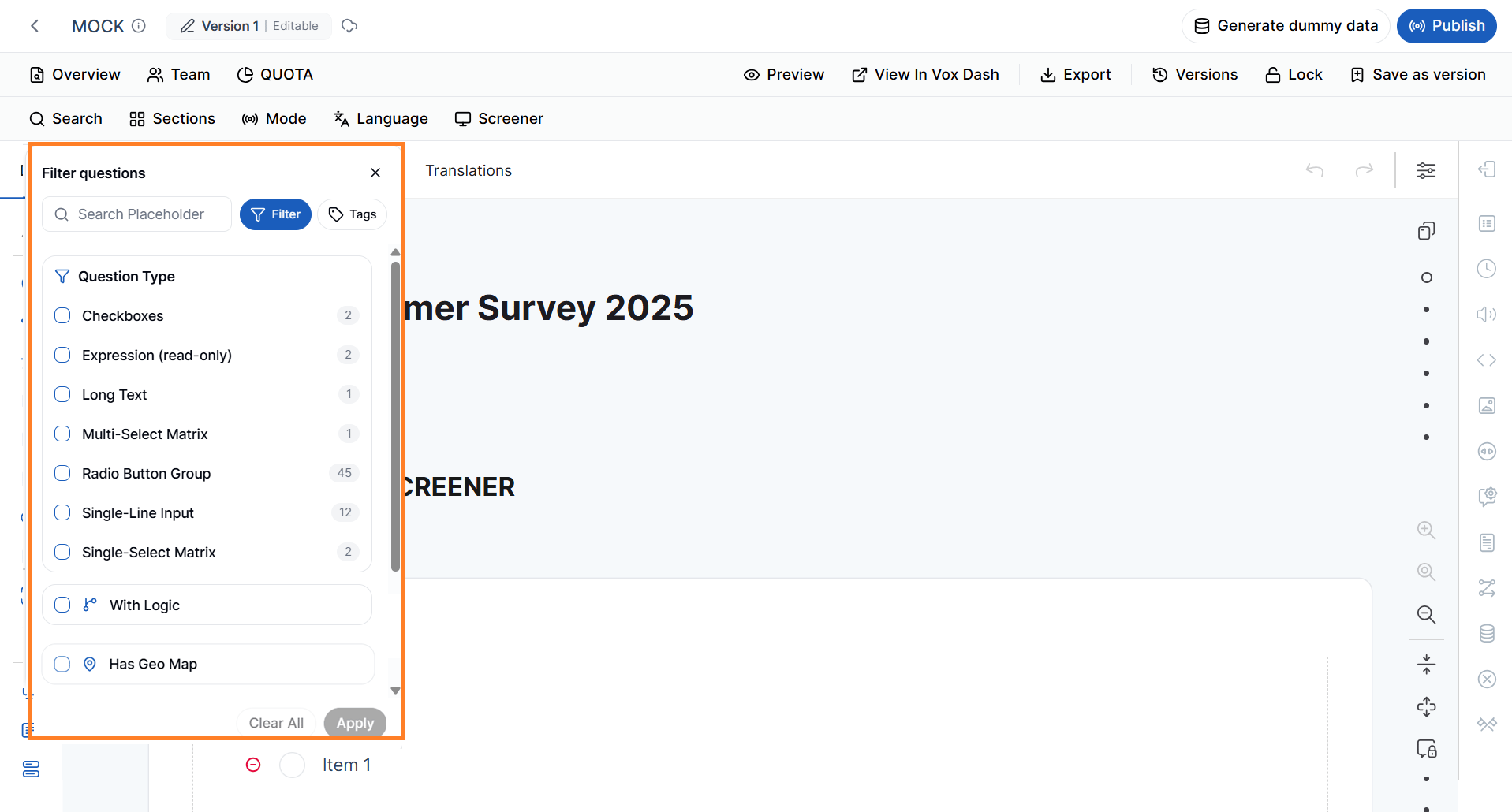 This is useful when reviewing or updating all questions of a particular type.
#### Search by Tags
The **Tags** filter allows you to find questions based on the tags that have been applied.
You can search for questions tagged as:
* Quota
* Screener
* Demographic
* Administrative
* Geo Map
* Auto Code
* Read Only
* Required
* Custom Tags
* Section Tags
* Data Collection Mode
* Multi-Language
This is useful when reviewing or updating all questions of a particular type.
#### Search by Tags
The **Tags** filter allows you to find questions based on the tags that have been applied.
You can search for questions tagged as:
* Quota
* Screener
* Demographic
* Administrative
* Geo Map
* Auto Code
* Read Only
* Required
* Custom Tags
* Section Tags
* Data Collection Mode
* Multi-Language
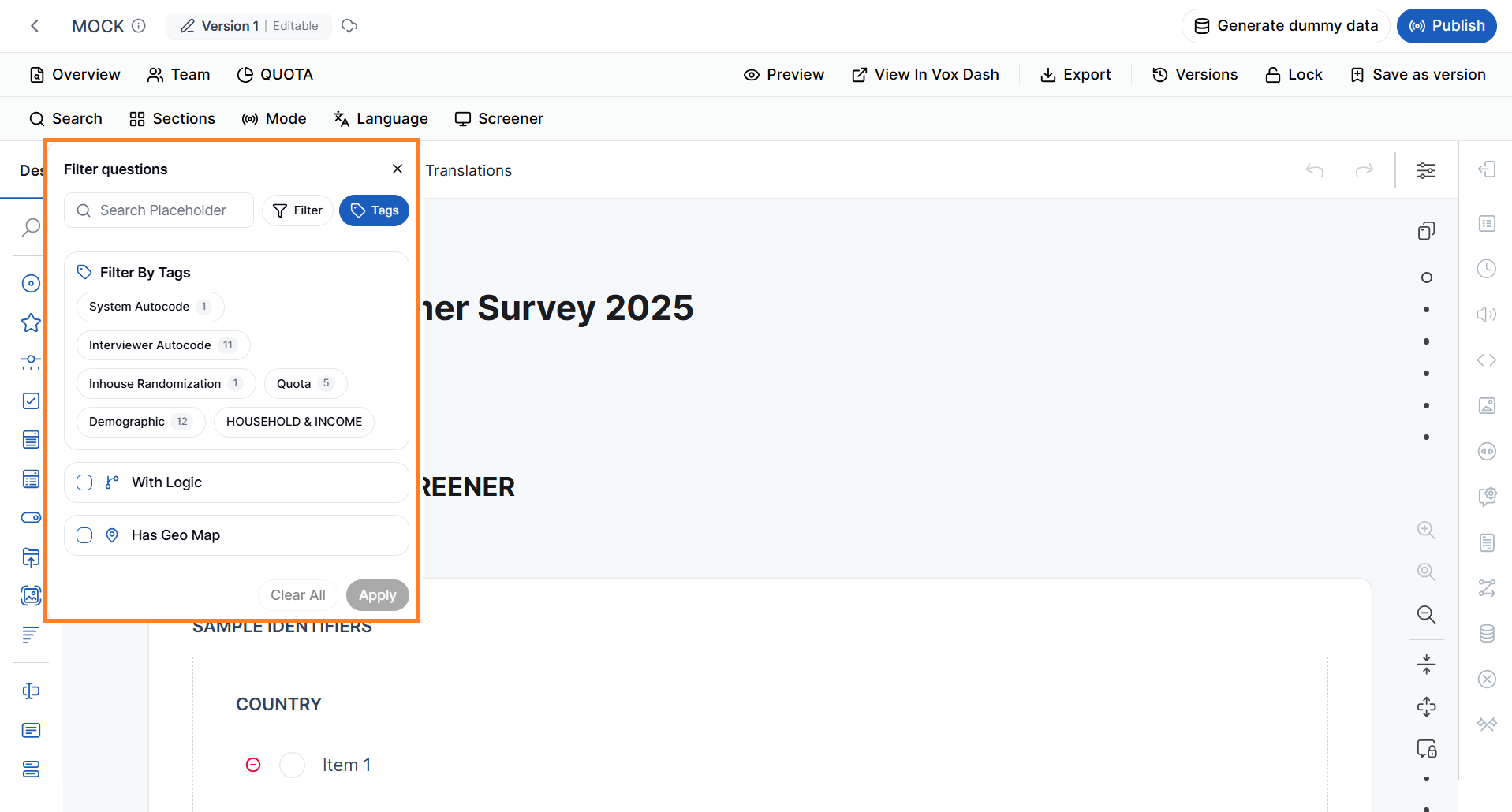 This feature makes it easy to locate groups of related questions throughout your questionnaire.
#### Search Geo Map Questions
You can quickly locate questions that have been assigned the **Geo Map** tag.
This filter is useful when working with questionnaires that include geographic information such as:
* Countries
* States or provinces
* Regions
* Cities
* Map-based selections
#### Search Questions With logics
You can quickly locate questions that have been had conditions.
This filter is useful when working with questionnaires that include logics and conditions.
This feature makes it easy to locate groups of related questions throughout your questionnaire.
#### Search Geo Map Questions
You can quickly locate questions that have been assigned the **Geo Map** tag.
This filter is useful when working with questionnaires that include geographic information such as:
* Countries
* States or provinces
* Regions
* Cities
* Map-based selections
#### Search Questions With logics
You can quickly locate questions that have been had conditions.
This filter is useful when working with questionnaires that include logics and conditions.
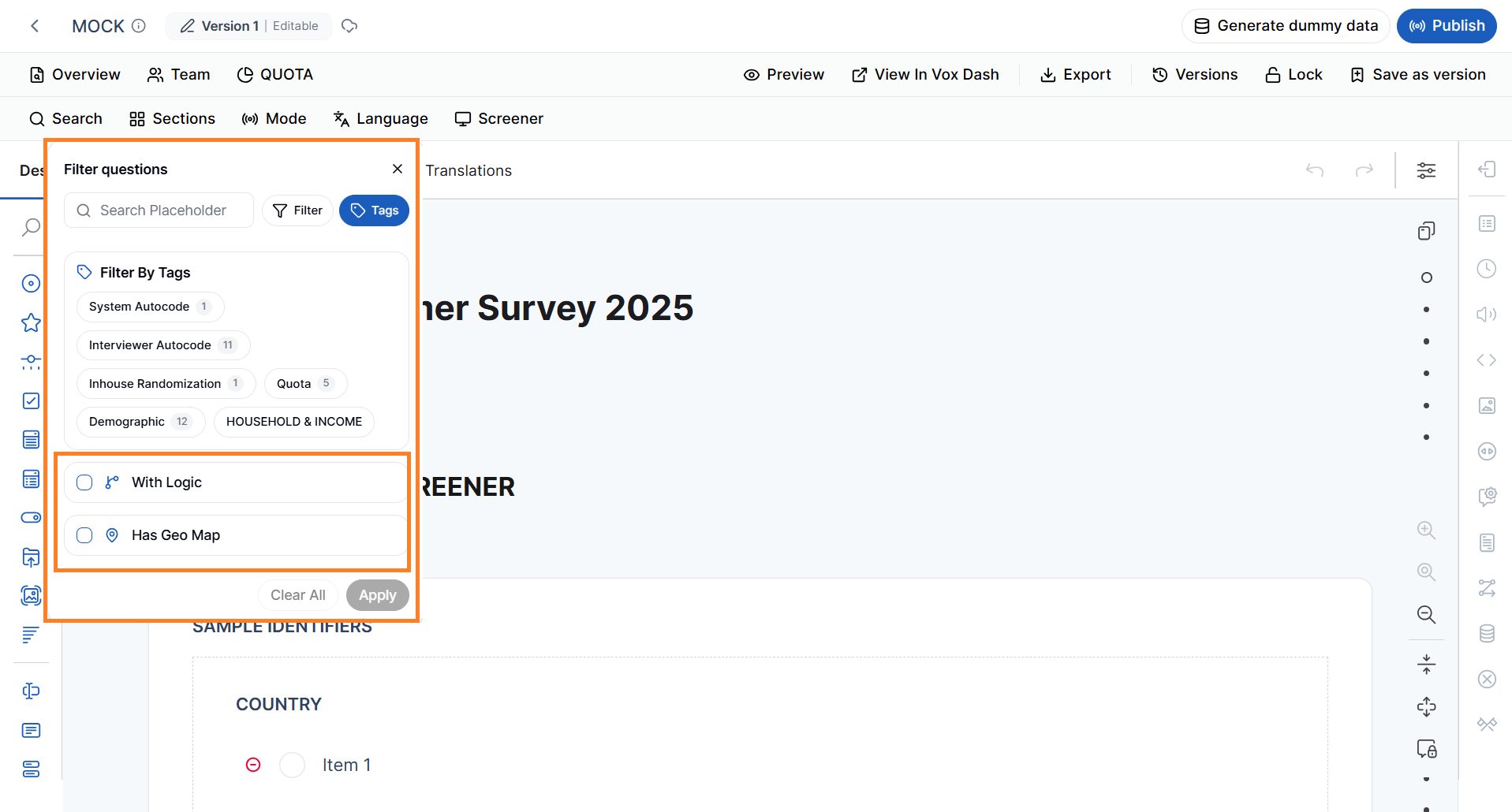 Geo Map questions can be reviewed independently from the rest of the questionnaire.
#### Combining Search and Filters
Search and filter options can be used together to narrow down your results.
For example, you can:
* Search for questions containing the word **Customer** while displaying only **Dropdown** questions.
* View only **Screener** questions in the **English** language.
* Display all **Quota** questions within the **Demographics** section.
* Find all **Geo Map** questions used in a specific data collection mode.
Combining filters helps you locate exactly the questions you need, even in very large questionnaires.
### Sections
The **Sections** filter displays questions based on their assigned **Section Tag**.
If you have organized your questionnaire into sections such as:
* Introduction
* Screening
* Product Usage
* Customer Satisfaction
* Demographics
you can select a section from this filter to display only the questions that belong to that section.
Geo Map questions can be reviewed independently from the rest of the questionnaire.
#### Combining Search and Filters
Search and filter options can be used together to narrow down your results.
For example, you can:
* Search for questions containing the word **Customer** while displaying only **Dropdown** questions.
* View only **Screener** questions in the **English** language.
* Display all **Quota** questions within the **Demographics** section.
* Find all **Geo Map** questions used in a specific data collection mode.
Combining filters helps you locate exactly the questions you need, even in very large questionnaires.
### Sections
The **Sections** filter displays questions based on their assigned **Section Tag**.
If you have organized your questionnaire into sections such as:
* Introduction
* Screening
* Product Usage
* Customer Satisfaction
* Demographics
you can select a section from this filter to display only the questions that belong to that section.
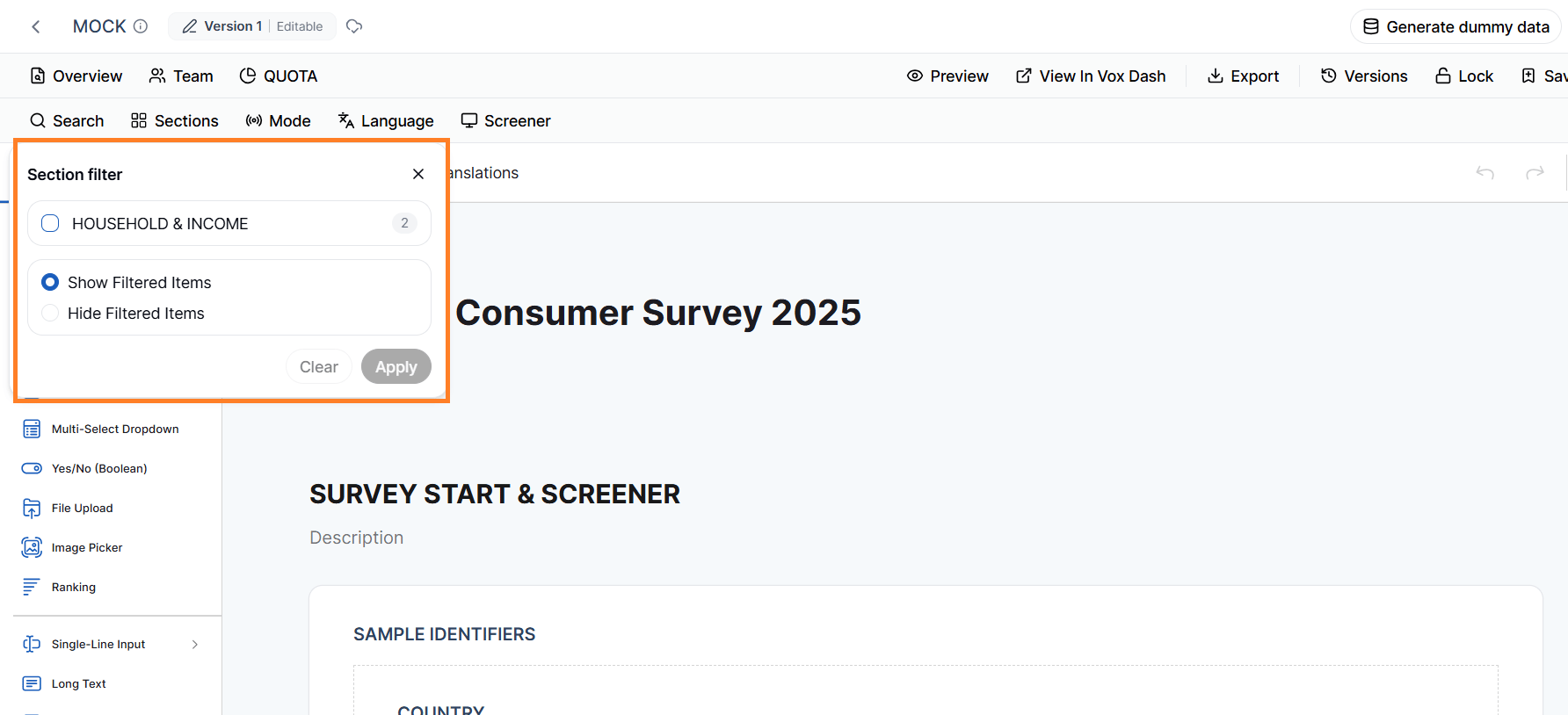 > **Note:** This filter is available only for questions that have been assigned a **Section** tag.
### Mode
The **Mode** filter allows you to display questions based on their assigned **Data Collection Mode**.
For example, you can filter questions that are intended for specific collection methods, such as:
* Web surveys
* Mobile surveys
* CATI
* CAPI
* Other supported data collection modes
This filter is useful when designing questionnaires that support multiple interviewing methods.
> **Note:** This filter is available only for questions that have been assigned a **Section** tag.
### Mode
The **Mode** filter allows you to display questions based on their assigned **Data Collection Mode**.
For example, you can filter questions that are intended for specific collection methods, such as:
* Web surveys
* Mobile surveys
* CATI
* CAPI
* Other supported data collection modes
This filter is useful when designing questionnaires that support multiple interviewing methods.
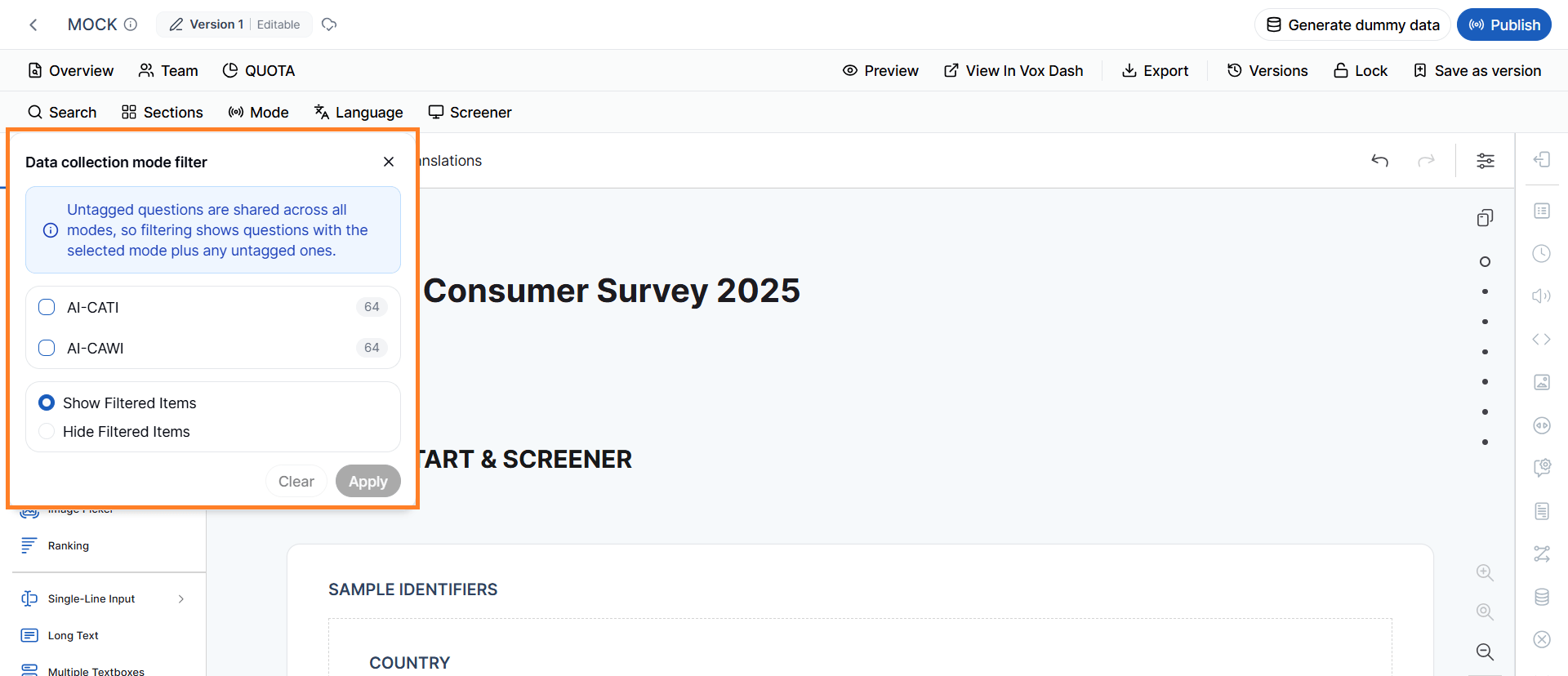 > **Note:** Only questions tagged with a **Data Collection Mode** are included in this filter.
### Language
The **Language** filter helps you view questions assigned to a specific language using the **Multi-Language** tag.
This is especially useful when maintaining multilingual questionnaires, allowing you to focus on one language at a time without being distracted by questions intended for other languages.
For example, you can display only:
* English questions
* French questions
* Spanish questions
depending on the selected language.
> **Note:** Only questions tagged with a **Data Collection Mode** are included in this filter.
### Language
The **Language** filter helps you view questions assigned to a specific language using the **Multi-Language** tag.
This is especially useful when maintaining multilingual questionnaires, allowing you to focus on one language at a time without being distracted by questions intended for other languages.
For example, you can display only:
* English questions
* French questions
* Spanish questions
depending on the selected language.
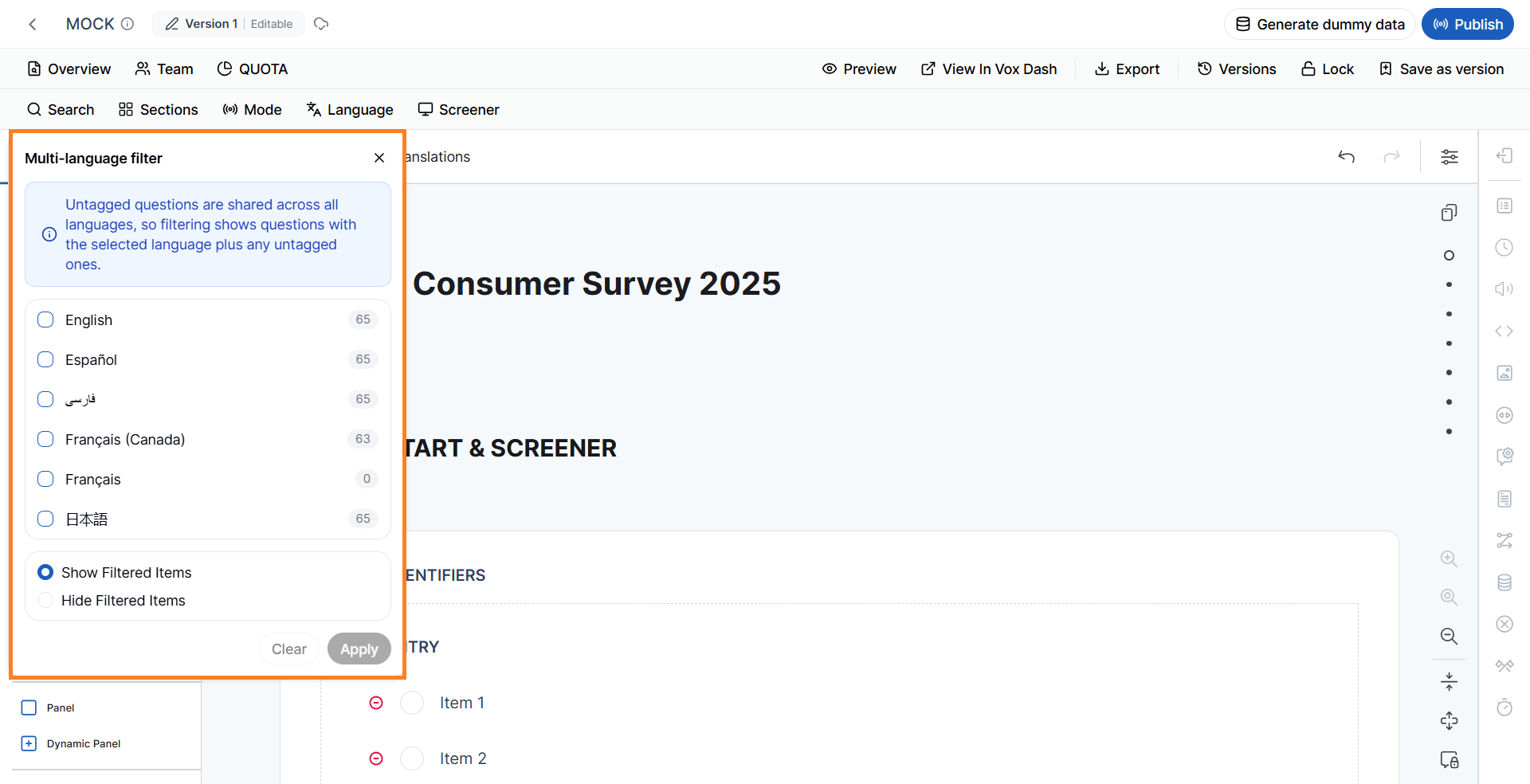 > **Note:** This filter only affects questions that have been assigned one or more **Multi-Language** tags.
### Screener
The **Screener** filter displays only questions marked with the **Screener** tag.
Screening questions are typically used to determine respondent eligibility before the main survey begins.
> **Note:** This filter only affects questions that have been assigned one or more **Multi-Language** tags.
### Screener
The **Screener** filter displays only questions marked with the **Screener** tag.
Screening questions are typically used to determine respondent eligibility before the main survey begins.
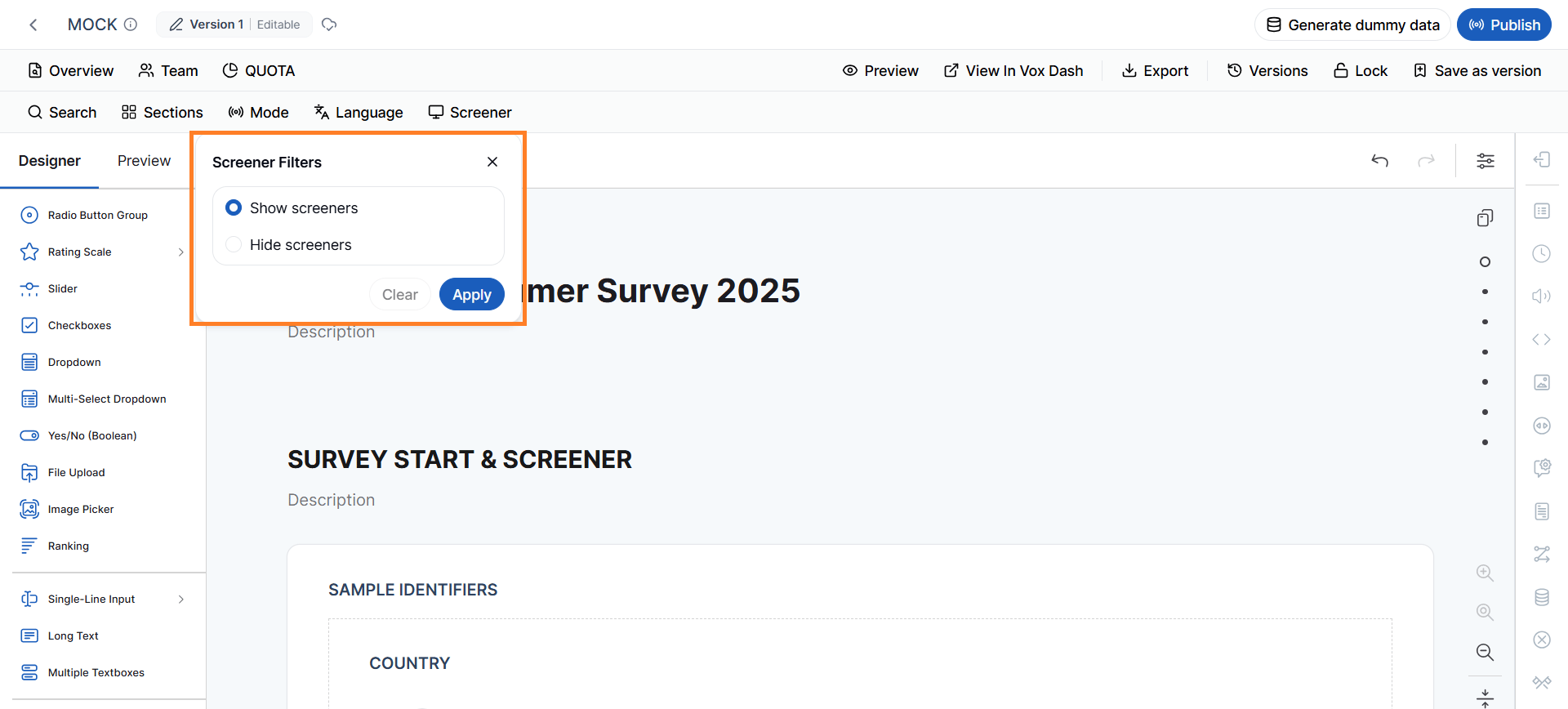 Using this filter allows questionnaire designers to quickly review or update all screening questions without searching through the entire questionnaire.
## Best Practices
When working with large questionnaires:
* Use meaningful question titles to improve search results.
* Organize related questions using **Section Tags**.
* Apply **Data Collection Mode**, **Language**, and **Screener** tags consistently so filters work effectively.
* Use **Question Type** filters when making bulk updates to similar questions.
* Combine multiple filters to quickly locate specific groups of questions, reducing the time spent navigating complex questionnaires.
Using this filter allows questionnaire designers to quickly review or update all screening questions without searching through the entire questionnaire.
## Best Practices
When working with large questionnaires:
* Use meaningful question titles to improve search results.
* Organize related questions using **Section Tags**.
* Apply **Data Collection Mode**, **Language**, and **Screener** tags consistently so filters work effectively.
* Use **Question Type** filters when making bulk updates to similar questions.
* Combine multiple filters to quickly locate specific groups of questions, reducing the time spent navigating complex questionnaires.