> ## Documentation Index
> Fetch the complete documentation index at: https://help.voxdash.com/llms.txt
> Use this file to discover all available pages before exploring further.
# Audit Trail
> In addition to standard usage reports, Voxdash provides a comprehensive Audit Trail feature that allows administrators to monitor detailed activity for each…
In addition to standard usage reports, Voxdash provides a comprehensive **Audit Trail** feature that allows administrators to monitor detailed activity for each dataset. This feature is especially useful for tracking changes, understanding user interactions, and maintaining accountability across your data assets.
## Accessing the Audit Trail
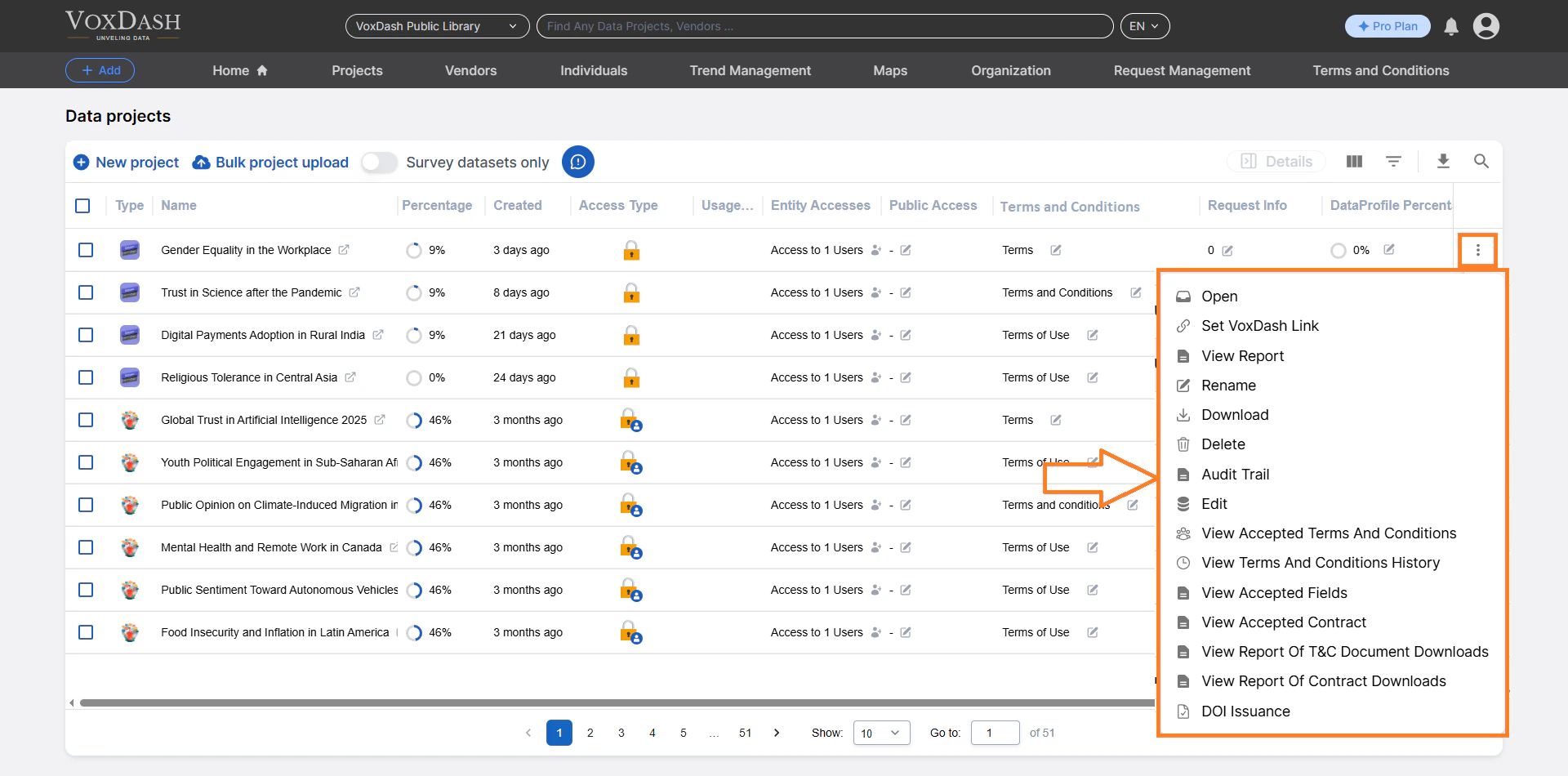
To view the Audit Trail for a dataset:
1. Navigate to the **Data Provider** section of the platform.
2. Open the **File Manager** tab.
3. Locate the dataset you want to review.
4. Click on the **menu (⋮)** next to the dataset.
5. Select **Audit Trail** from the dropdown options.
This will take you to the Audit Trail page for the selected dataset.
 ## What Information is Available?
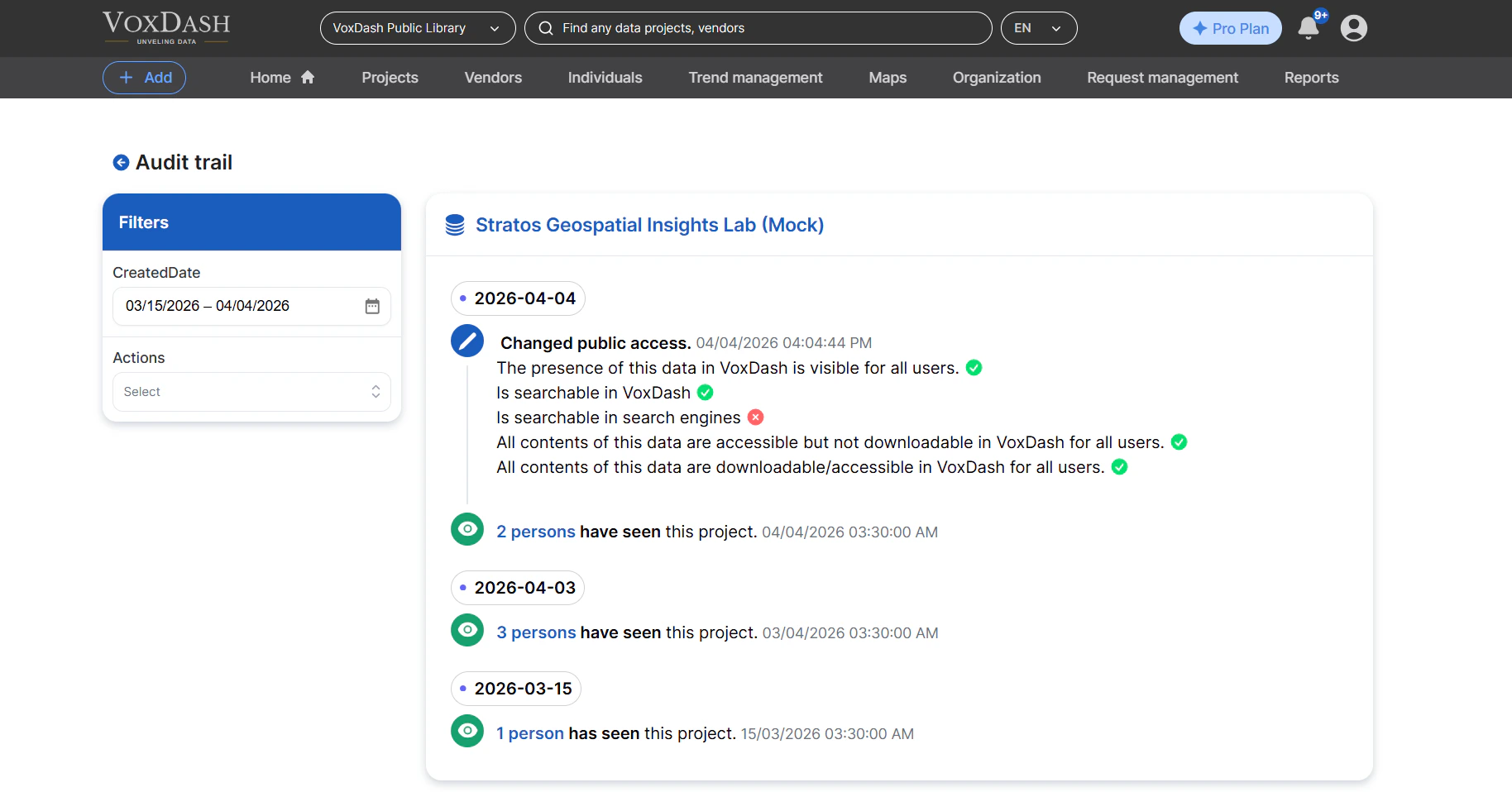
The Audit Trail provides a detailed, date-based log of activities associated with each dataset. The following types of information are included:
* **Public Access Changes**
Track when a dataset’s visibility has been modified (e.g., made public or restricted).
* **Page View Reports**
Monitor how often the dataset has been viewed, helping you understand engagement and usage trends.
All records are timestamped, allowing you to trace activity over specific periods.
## What Information is Available?
The Audit Trail provides a detailed, date-based log of activities associated with each dataset. The following types of information are included:
* **Public Access Changes**
Track when a dataset’s visibility has been modified (e.g., made public or restricted).
* **Page View Reports**
Monitor how often the dataset has been viewed, helping you understand engagement and usage trends.
All records are timestamped, allowing you to trace activity over specific periods.
 ## Using Filters
The Audit Trail includes a filtering system to help you quickly locate relevant records. Administrators can refine the displayed data using the following filters:
* **Created Date**
Filter records based on when the activity occurred.
* **Action Type**
Filter by specific types of actions performed on the dataset. Available actions include:
* **Indexed Change** – Indicates updates to the dataset’s indexing status.
* **Downloadable Change** – Tracks changes to whether the dataset can be downloaded.
* **Viewed** – Records when the dataset has been accessed or viewed by users.
Using these filters, you can efficiently analyze dataset activity and focus on the most relevant events.
## Using Filters
The Audit Trail includes a filtering system to help you quickly locate relevant records. Administrators can refine the displayed data using the following filters:
* **Created Date**
Filter records based on when the activity occurred.
* **Action Type**
Filter by specific types of actions performed on the dataset. Available actions include:
* **Indexed Change** – Indicates updates to the dataset’s indexing status.
* **Downloadable Change** – Tracks changes to whether the dataset can be downloaded.
* **Viewed** – Records when the dataset has been accessed or viewed by users.
Using these filters, you can efficiently analyze dataset activity and focus on the most relevant events.