> ## Documentation Index
> Fetch the complete documentation index at: https://help.voxdash.com/llms.txt
> Use this file to discover all available pages before exploring further.
# DOI in VoxDash
## What is a DOI?
A **Digital Object Identifier (DOI)** is a permanent, unique alphanumeric string assigned to a digital resource. It acts as a stable reference that allows users to reliably locate and cite content over time.
DOIs are widely used across academic, research, and data-driven industries to identify:
* Research papers and journal articles
* Datasets and data projects
* Technical reports and whitepapers
* Software and code repositories
* Industry standards and documentation
Unlike a standard URL, which may break if content is moved or deleted, a DOI always resolves to the current location of the resource. This makes it especially valuable for long-term data sharing, citation, and collaboration.
## Why Use a DOI in VoxDash?
In VoxDash, assigning a DOI to your data project enhances its visibility, credibility, and accessibility.
By generating a DOI, you can:
* **Make your project discoverable**: Your project is added to the VoxDash public catalog
* **Enable citation and sharing**: Others can reference your project using a permanent identifier
* **Improve data governance**: DOIs help track and manage published datasets
* **Support collaboration**: Teams and external users can reliably access your work
This is particularly useful for organizations working in **data analytics and eCommerce**, where sharing validated datasets, dashboards, or insights can drive decision-making and transparency.
## Important Considerations Before Generating a DOI
Before assigning a DOI, review the following:
**Public Access Requirement**
Generating a DOI will automatically make your project **public**. This means:
* All VoxDash users will be able to view your project
* The project will appear in the shared catalog
* Sensitive or proprietary data should be removed or anonymized
**Data Readiness**
Ensure your project is finalized and ready for external use. After publishing:
* Changes may impact users who rely on your dataset
* Version control becomes important for maintaining consistency
**Metadata Quality**
High-quality metadata improves discoverability. Make sure your project includes:
* A clear and descriptive title
* A detailed description of the dataset or analysis
* Relevant tags and categories
* Author or organization information
## How to Generate a DOI for Your Project
Follow these step-by-step instructions:
1. **Go to the Data Provider Section**
Log in to VoxDash and navigate to the **Data Provider** module from the main dashboard.
2. **Open the File Manager**
In the Data Provider section, locate the **File Manager** table where all your data projects are listed.
3. **Find Your Project**
Browse or search for the project you want to publish.
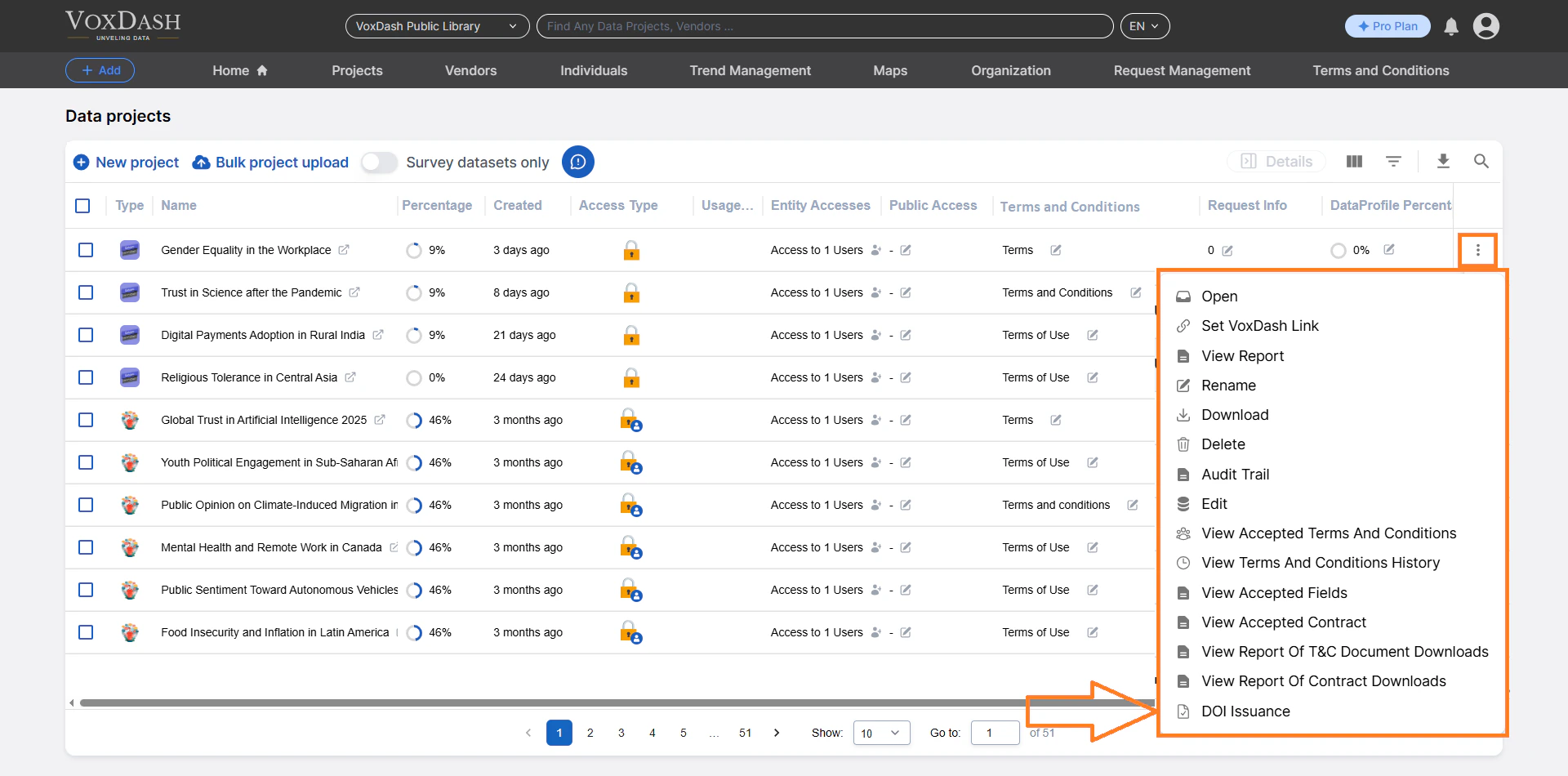
4. **Access the Project Menu**
Click the **menu button** (three-dot icon) next to the project name to open the action menu.
5. **Select “Generate DOI”**
From the options, click **DOI** to initiate the process.
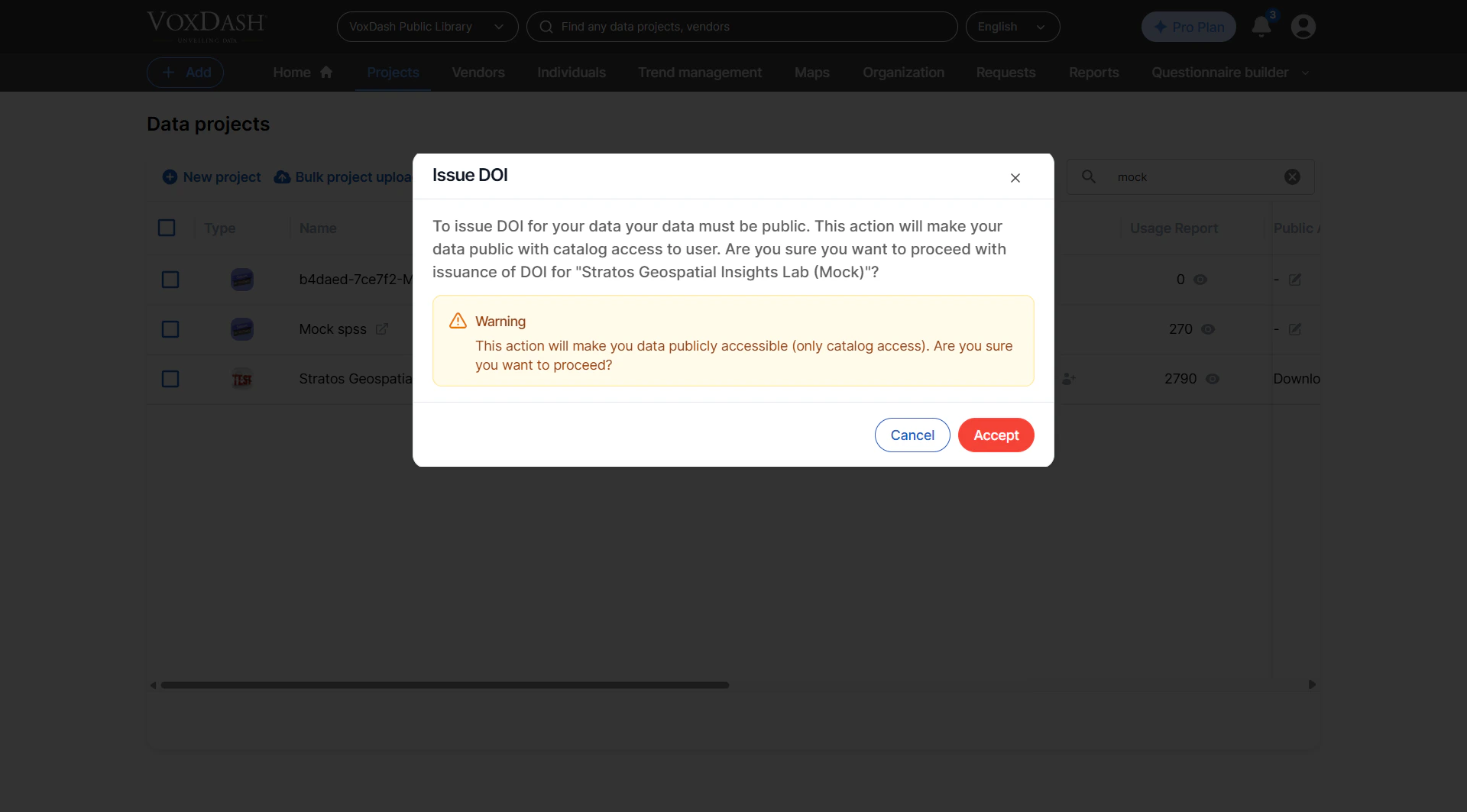
 6. **Review Confirmation Prompt**
A confirmation dialog may appear. Carefully review the notice about public access and proceed if ready.
7. **Generate the DOI**
Confirm your selection. VoxDash will assign a unique DOI to your project and publish it to the catalog.
6. **Review Confirmation Prompt**
A confirmation dialog may appear. Carefully review the notice about public access and proceed if ready.
7. **Generate the DOI**
Confirm your selection. VoxDash will assign a unique DOI to your project and publish it to the catalog.
 ## What Happens After DOI Generation?
Once a DOI is created:
* Your project becomes **publicly accessible**
* A **unique DOI link** is generated for sharing and citation
* The project is indexed in the **VoxDash catalog**
* Other users can **search, view, and reference** your data
You can now:
* Share the DOI in reports, dashboards, or external platforms
* Use it in documentation or academic-style citations
## Best Practices
To get the most value from DOI-enabled projects:
* Publish only **high-quality, validated datasets**
* Avoid including **sensitive or confidential information**
* Use clear naming conventions for projects
* Provide context so others can understand and reuse your data
* Share DOIs in internal and external communications to standardize references
## What Happens After DOI Generation?
Once a DOI is created:
* Your project becomes **publicly accessible**
* A **unique DOI link** is generated for sharing and citation
* The project is indexed in the **VoxDash catalog**
* Other users can **search, view, and reference** your data
You can now:
* Share the DOI in reports, dashboards, or external platforms
* Use it in documentation or academic-style citations
## Best Practices
To get the most value from DOI-enabled projects:
* Publish only **high-quality, validated datasets**
* Avoid including **sensitive or confidential information**
* Use clear naming conventions for projects
* Provide context so others can understand and reuse your data
* Share DOIs in internal and external communications to standardize references