

VoxDash AI Chatbot
The VoxDash AI Chatbot is an intelligent analytics assistant built directly into the VoxDash platform. After creating a data project, you can use the chatbot to analyze your entire project or focus on a single uploaded file. Instead of manually building reports or writing formulas, you can simply ask questions in natural language and receive instant, data-driven insights. The AI chatbot is designed to help users quickly explore datasets, uncover trends, compare segments, and generate actionable insights without requiring advanced technical or statistical expertise.ChatGPT Integration
VoxDash now includes seamless integration with ChatGPT, bringing powerful AI-driven analytics directly into your workflow. This integration allows users to:- Interact with data conversationally
- Generate insights instantly
- Simplify advanced analysis tasks
- Reduce manual reporting work
- Explore data without technical expertise
How to Access the AI Chatbot
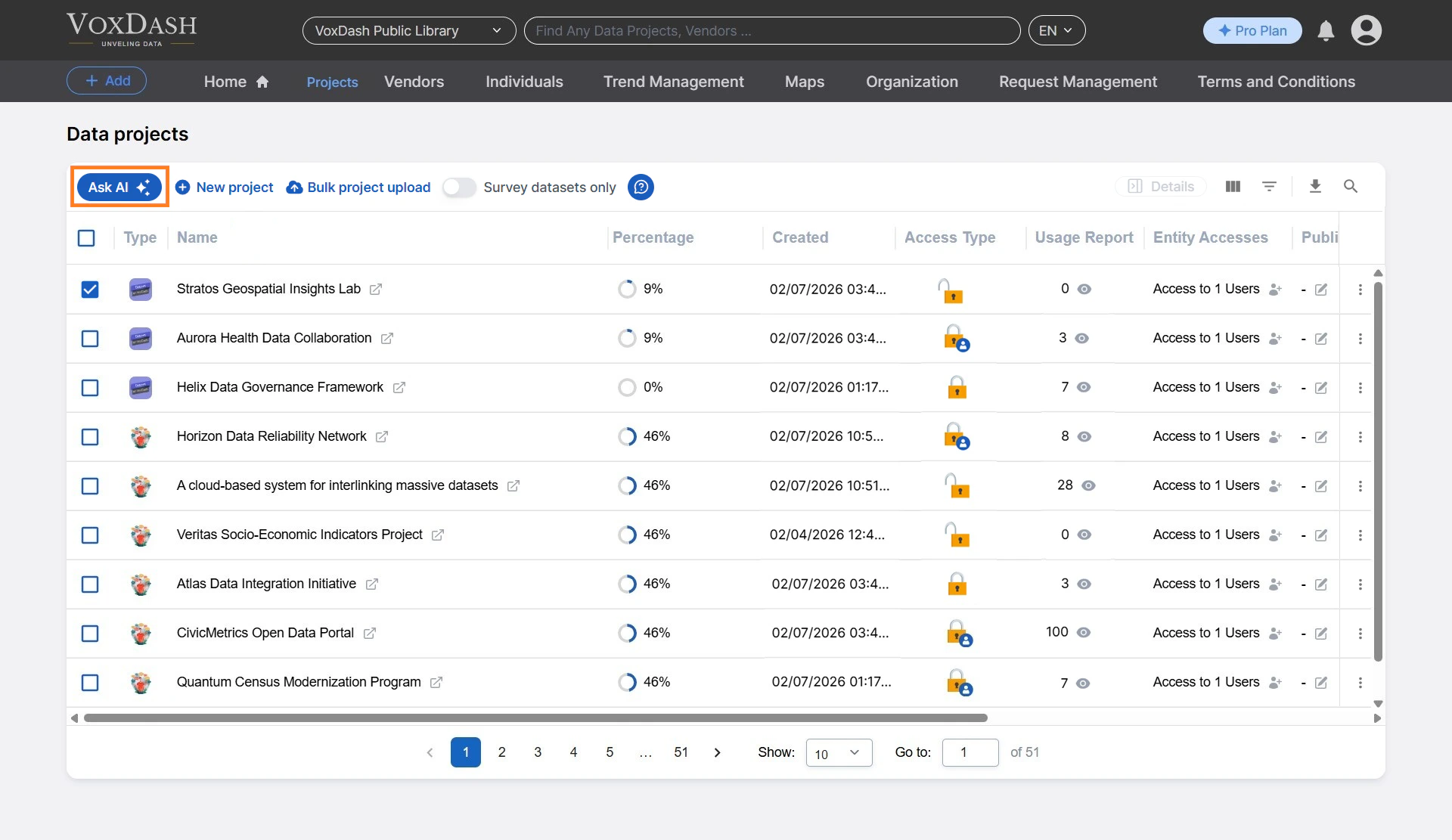
To open the AI Chatbot:- Navigate to the File Manager page.
- Select a project, or open a project and select a specific file.
- Click the Ask AI button.
- The entire project dataset
- A selected individual file depending on the context you choose.
Available Analysis
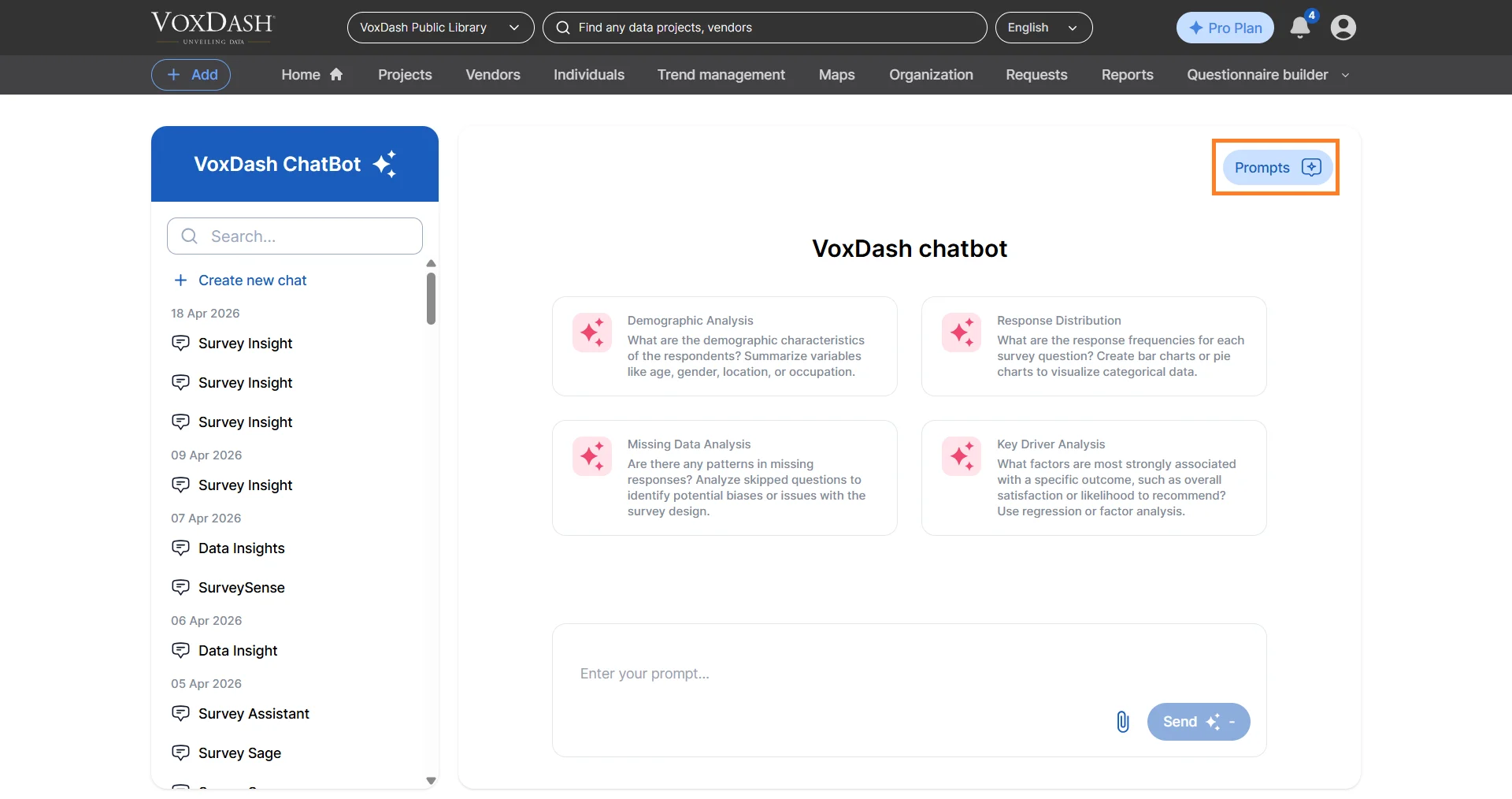
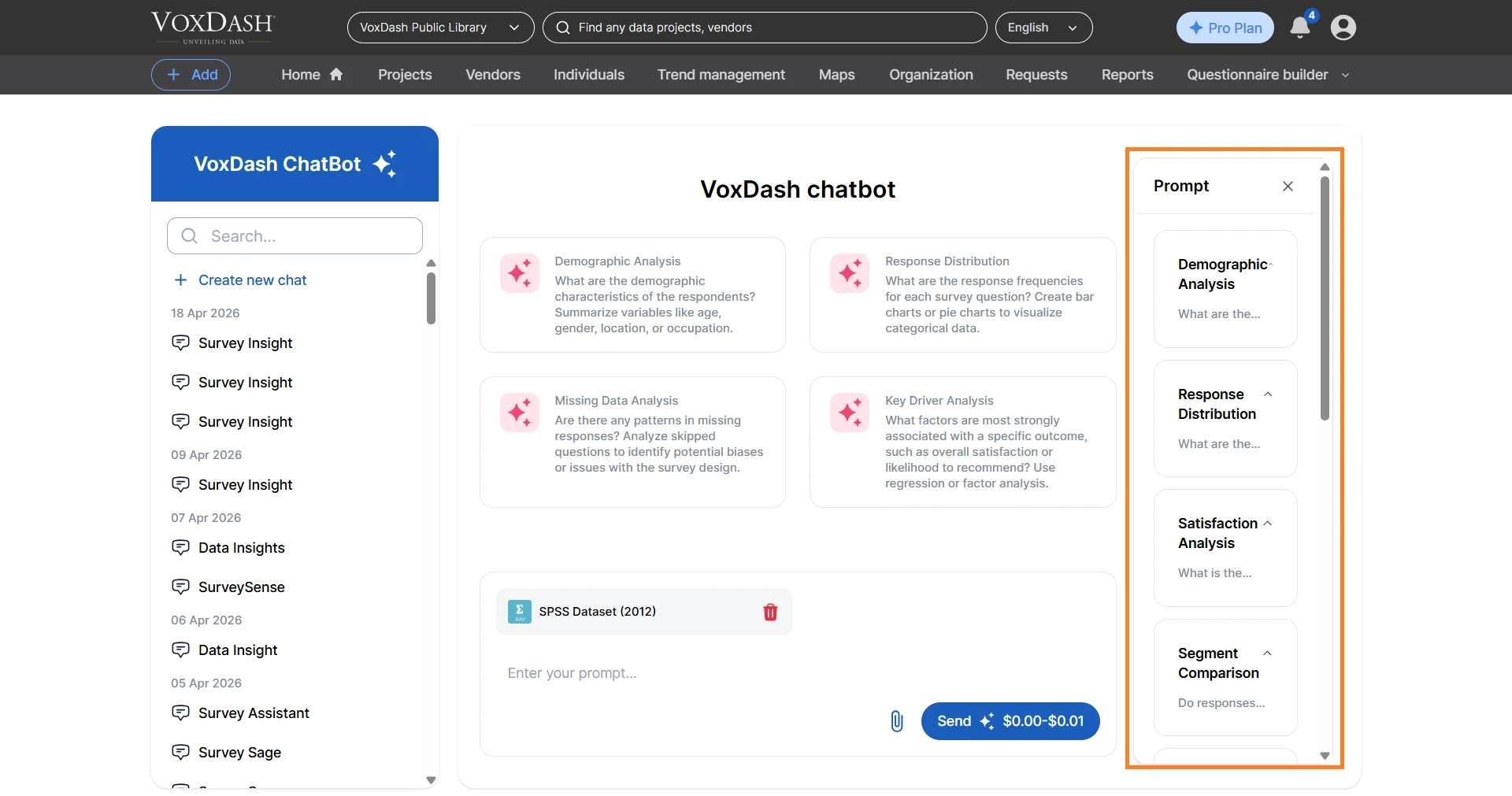
VoxDash AI Chat supports a wide range of analytics and reporting functions commonly used in market research, e-commerce analytics, customer experience analysis, and business intelligence workflows. VoxDash provides ready-to-use prompt for each of these categories to ease users use.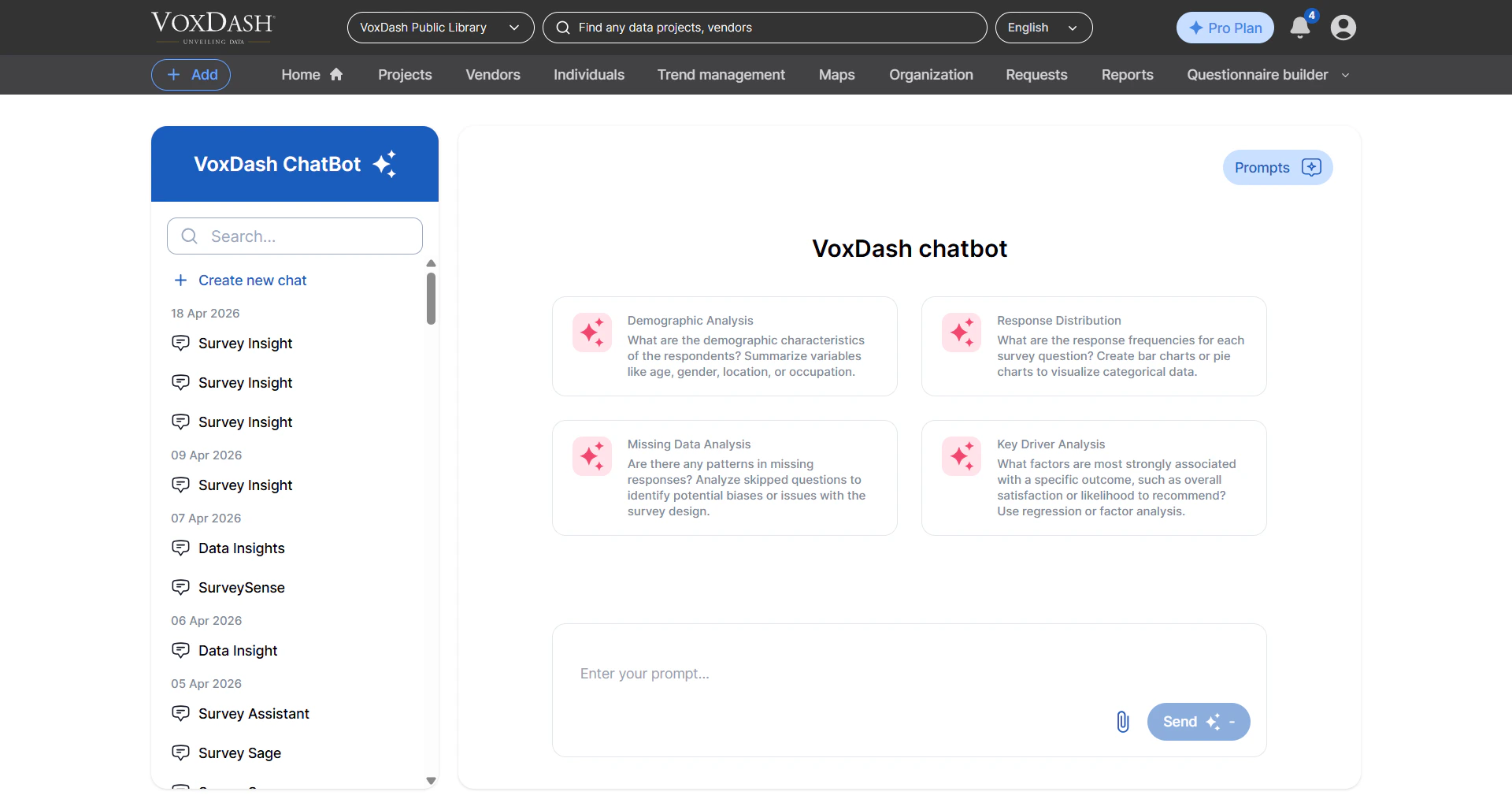
Demographic Analysis
Analyze how different demographic groups respond to surveys, products, or services. You can compare responses by age, gender, income level, region, education, customer type, and more. Example questions:- “How do customer satisfaction scores differ by age group?”
- “Which demographic segment purchases the most frequently?”
Response Distribution Analysis
Understand how responses are distributed across survey questions, ratings, or categories. This helps identify trends, preferences, and unusual response patterns. Example use cases:- Viewing rating distributions for customer satisfaction surveys
- Identifying the most selected product categories
- Measuring approval or disagreement percentages
Missing Data Analysis
Identify incomplete responses, blank fields, or missing values within your datasets. VoxDash helps you detect data quality issues before conducting deeper analysis. The AI can:- Detect missing or inconsistent responses
- Show which variables contain the most missing data
- Recommend ways to clean or interpret incomplete datasets
Key Driver Analysis
Determine which factors have the strongest impact on outcomes such as customer satisfaction, purchase intent, loyalty, or conversion rates. Example questions:- “What factors most influence customer satisfaction?”
- “Which variables are driving repeat purchases?”
Satisfaction Analysis
Measure and evaluate satisfaction levels across products, services, customer groups, or experiences. The AI can help:- Identify highly satisfied and dissatisfied groups
- Detect patterns in customer feedback
- Compare satisfaction across regions, products, or time periods
Segment Comparison
Compare behaviors, preferences, or performance between different groups or categories. Example comparisons:- New customers vs. returning customers
- Q1 sales vs. Q2 sales
- Male vs. female respondents
- High-value customers vs. low-value customers
Correlation Analysis
Identify relationships between variables in your dataset. For example:- Determine whether customer satisfaction is related to delivery speed
- Analyze whether higher spending correlates with customer loyalty
- Understand relationships between survey variables
Open-Ended Text Analysis
Analyze written responses, customer comments, reviews, or feedback using AI-powered natural language processing. The chatbot can:- Detect common themes and topics
- Identify positive or negative sentiment
- Summarize large volumes of text responses
- Highlight frequently mentioned issues or suggestions
Trend Analysis
Track changes and patterns over time using historical or time-series data. Examples include:- Monitoring monthly sales growth
- Tracking changes in customer satisfaction over time
- Identifying seasonal buying behavior
- Detecting upward or downward performance trends
Ranking Analysis
Rank products, categories, survey responses, or performance metrics based on selected criteria. Examples:- Top-performing products by revenue
- Highest-rated services
- Most common customer complaints
- Best-performing sales regions
What You Can Do With AI Chat
With AI Chat, you can upload datasets directly into VoxDash and begin asking questions immediately. The AI understands natural language queries and returns clear, data-driven answers to help you uncover insights quickly and efficiently. Instead of relying on spreadsheets, formulas, or manual reporting, users can interact with their data conversationally. The AI can generate:- Summaries
- Charts and visualizations
- Tables
- Bullet-point insights
- Comparisons
- Statistical observations
- Predictive interpretations
Supported File Types
VoxDash AI Chat supports a variety of structured data formats, including:- Survey files (
.csv,.xlsx) - SPSS datasets (
.sav) - Excel spreadsheets
- Structured tabular datasets
- Multi-file project uploads
- Variable labels
- Value labels
- Metadata
- Survey structure information
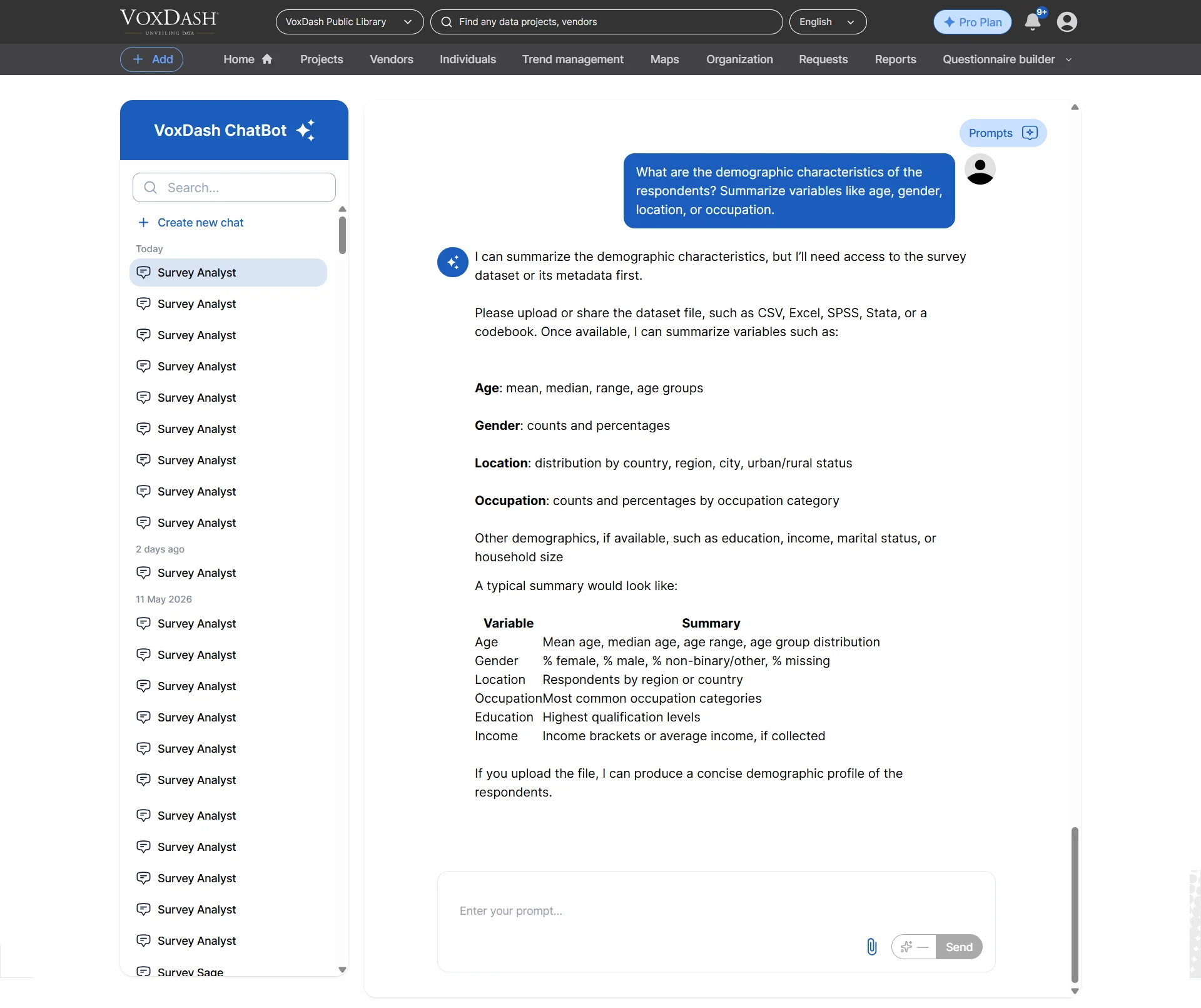
Ask Questions Naturally
VoxDash AI Chat is designed to work like a conversation. You do not need to write SQL queries, formulas, or complex analytical commands. Simply ask questions in plain English, such as:- “Which political party is most likely to win based on this survey data, and why?”
- “What are the top concerns among respondents aged 18–25?”
- “Which products have the highest return rates?”
- “Why are customers requesting refunds?”
- “Compare sales trends between Q1 and Q2.”
- “Which customer segment generates the highest revenue?”
- “What factors are most strongly associated with customer churn?”
Example Use Cases
Market Research
Upload survey results to:- Measure public opinion
- Analyze customer preferences
- Identify market trends
- Predict consumer behavior
E-Commerce Analytics
Analyze sales and customer behavior data to:- Identify top-performing products
- Detect purchasing trends
- Understand customer segments
- Reduce return rates
- Improve conversion performance
Customer Experience Analysis
Evaluate customer feedback and satisfaction data to:- Discover pain points
- Monitor customer sentiment
- Improve service quality
- Track satisfaction over time
Academic and Research Projects
Researchers and students can simplify complex data analysis without requiring advanced statistical software. Use VoxDash to:- Analyze survey datasets
- Compare respondent groups
- Explore correlations
- Generate summaries and insights quickly
Tips for Best Results
To improve analysis accuracy and AI-generated insights:- Use clear and specific questions whenever possible.
- Ensure uploaded files contain properly labeled column headers.
- Organize datasets consistently before uploading.
- Include descriptive variable names for easier interpretation.
- Upload clean, structured data for the best analytical performance.
- When using multiple files, ensure related datasets share consistent naming conventions.