

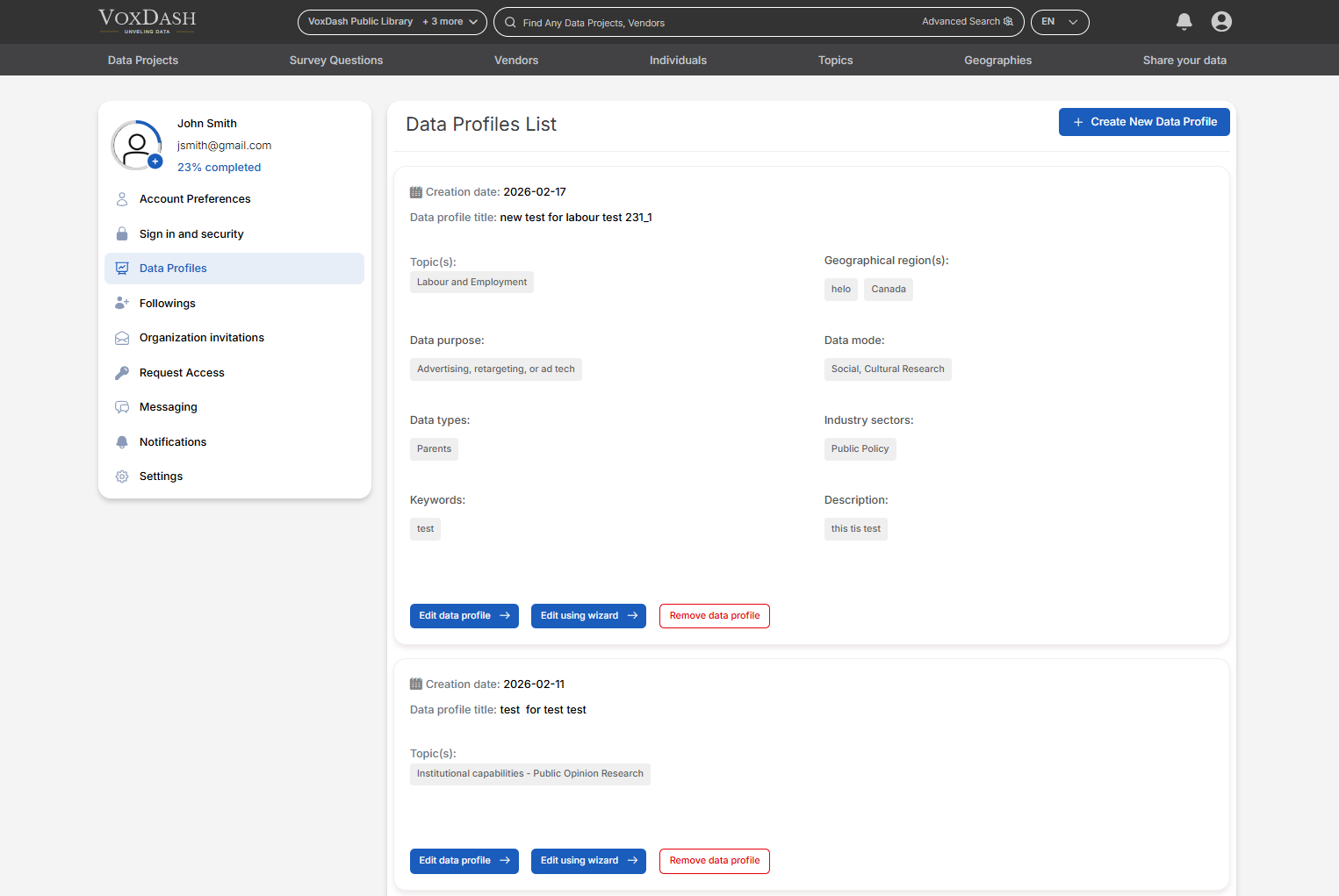
1. What Is a Data Profile?
A Data Profile is a structured metadata template that contains detailed information about a dataset or project. It typically includes:- Dataset title and description
- Category or industry classification
- Methodology or data source
- Data collection period
- Variables or metrics included
- Geographic coverage
- Data owner or organization details
2. Available Actions on the Data Profiles List Page
On this page, you can perform the following actions:2.1 Edit a Data Profile
You can update an existing data profile at any time. Editing allows you to:- Modify metadata fields
- Update descriptions
- Add missing information
- Correct inaccuracies
- Improve data documentation quality
2.2 Create a New Data Profile
You can create a new data profile directly from this page. This is useful when:- Preparing metadata before uploading a dataset
- Standardizing information across multiple projects
- Creating reusable templates for similar data categories
2.3 Remove a Data Profile
You can delete a data profile that is no longer needed. Important Considerations:- If the data profile is linked to active projects, you may need to unlink or reassign those projects before deletion.
- Deleting a data profile may remove associated metadata from linked projects.
3. Data Profile Overview Information
For each data profile listed, you can view key details, including:3.1 Linked Projects
See how many data projects are associated with a specific data profile. This helps you:- Understand profile usage
- Identify widely used templates
- Avoid deleting profiles that are actively linked
3.2 Creation Date
Displays the date the data profile was created. This is useful for:- Tracking profile versions
- Reviewing outdated templates
- Managing lifecycle updates
3.3 Completed Fields
You can view all completed fields within each data profile. This helps you:- Identify missing information
- Ensure metadata completeness
- Improve dataset transparency
- Maintain high-quality documentation standards
4. Why Data Profiles Matter
In a data analytics and eCommerce SaaS environment, well-structured data profiles:- Improve dataset organization
- Enhance internal collaboration
- Increase data transparency
- Support compliance requirements
- Improve reporting and insights generation
- Help users understand the dataset before accessing it