Wizard 1 (Survey Info)
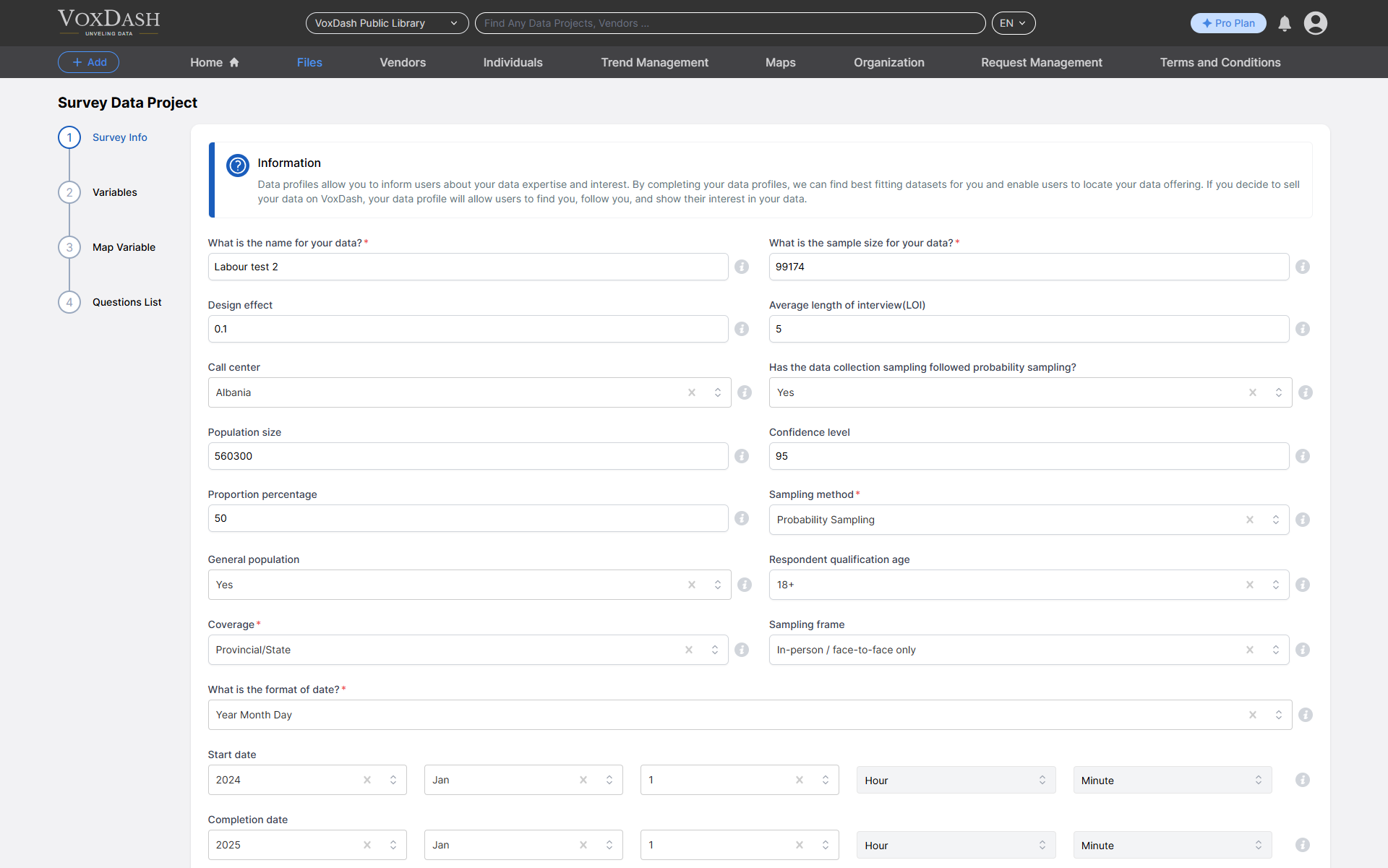
- What is the name for your data? Add a clear, descriptive name for the data.
- What is the sample size for your data? Provide the total number of samples or respondents included in your data.
- Design Effect: Specify the design effect value to account for variance caused by sampling methods.
- Average Length of Interview(LOI): Enter the average time (in minutes) it took to complete the interviews.
- Call Center: Enter details about the call center associated with this dataset or vendor. This may include the call center’s name, location, or role in data collection. Providing this ensures transparency, helps validate survey methodology, and supports compliance reviews.
- Has the data collection sampling followed probability sampling? Indicate whether the sampling method used is based on probability.
- Population Size: Specify the total population size from which the sample was drawn.
- Confidence Level Enter the confidence level used to calculate the margin of error (e.g., 95%).
- Proportion Percentage Specify the assumed proportion percentage used for the margin of error calculation(default: 50%).
- Sampling Method: Select all sampling techniques used to select participants. Sampling methods determine how units were chosen from the population whether through randomization, quotas, referrals, or self-selection and directly affect the statistical validity and generalizability of findings.
- General Population: Describe the target population represented in your survey.
- Respondent Qualification Age: Specify the minimum age for participation (default: 18 years).
- Coverage: Indicate the geographic scope of the survey (e.g., global, national, city-level).
- Sampling Frame: Specify the source of the sampling frame used for data collection.
- What is the format of date? Specify the date format used in the dataset (e.g., DD/MM/YYYY).
- Collection Date (Start date/ Completion date): Match this with the date entered in the general data entry section.
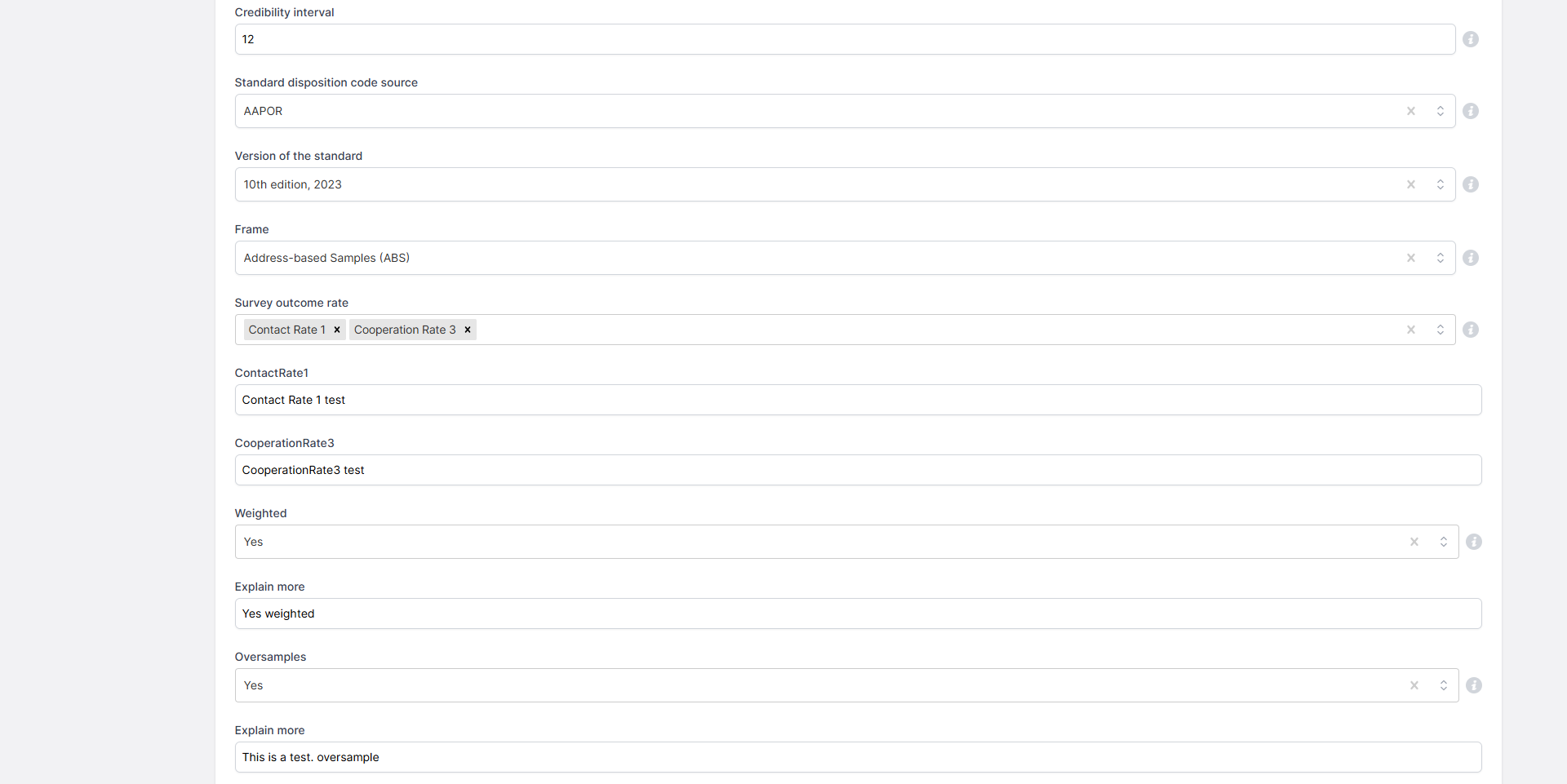
- Credibility Interval: Enter the credibility interval used in your analysis, if applicable.
- Standard Disposition Code Source: Identify the source system used for disposition codes (for example: AAPOR Standard Definitions, internal company codes, ESOMAR). This clarifies how outcome categories such as completes, refusals, or ineligibles were defined.
- Version of the Standard: Indicate the version number or year of the methodological or reporting standard applied (for example: AAPOR Transparency Initiative v4, ISO 20252:2019). Including the version allows others to interpret results in light of the exact rules in force.
- Frame: Specify the sampling frame used to select respondents. Examples: Random Digit Dialing (RDD), Address-Based Sampling (ABS), voter registry, or online panel list. Documenting the frame helps users understand coverage, representativeness, and potential sources of bias.
- Survey Outcome Rate: Enter the survey’s outcome rate as defined by the methodology used. This value reflects completed interviews relative to all resolved sample records and helps describe overall fieldwork performance.
- Weighted: Indicate whether the data has been weighted and explain the weighting process.
- Oversamples: Indicate if any oversampling was done and explain the purpose.
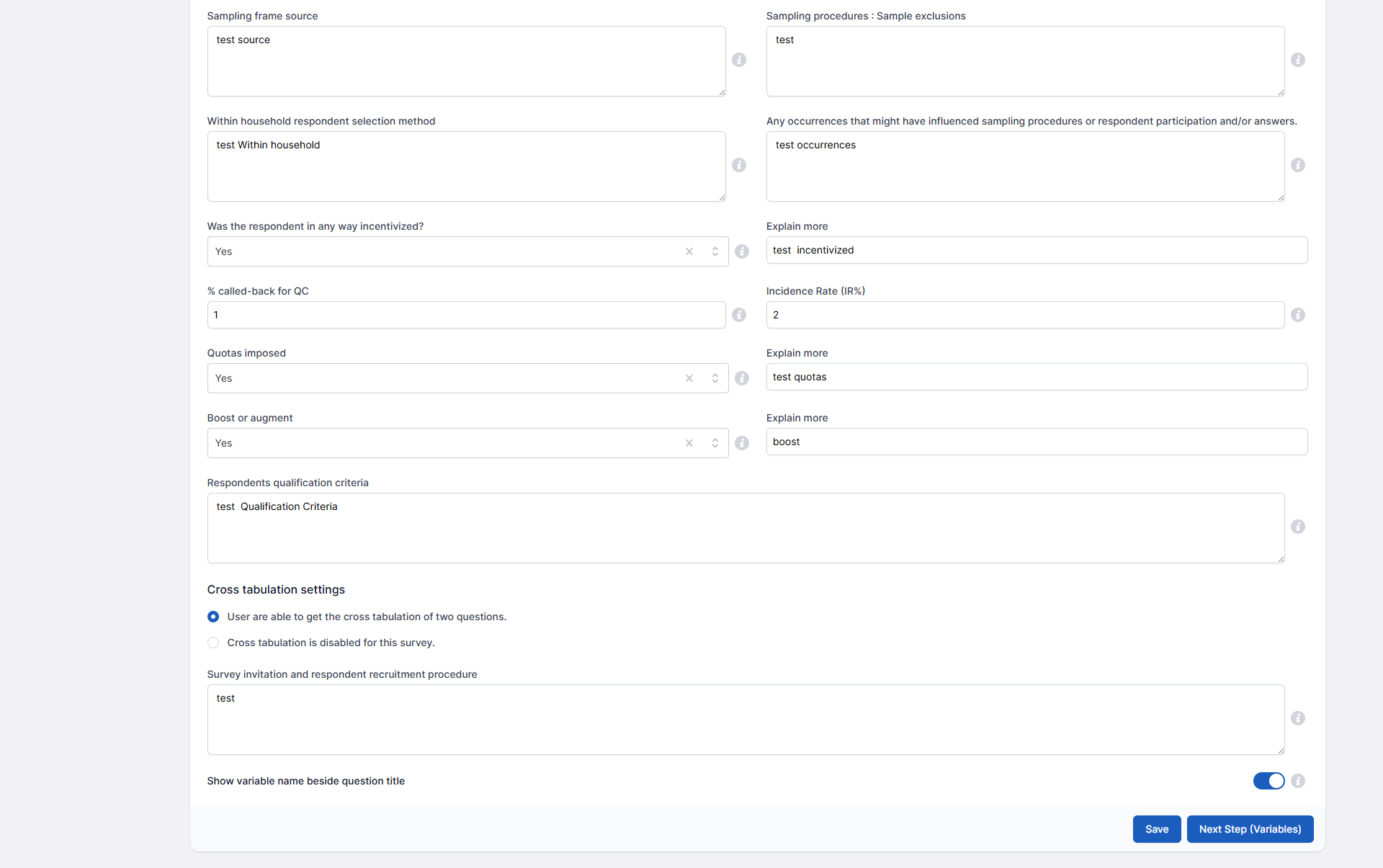
- Sampling Frame Source: Specify the source of the sampling frame used for data collection.
- Sampling Procedures: Describe any specific procedures or exclusions applied during sampling.
- Within Household Respondent Selection Method: Describe the method used to select respondents within a household.
- Any Occurrences That Might Have Influenced Sampling Procedures or Respondent Participation and/or Answers: Mention any events or factors that may have influenced sampling or outcomes.
- Was the Respondent in Any Way Incentivized?: Specify whether incentives were provided to respondents and describe them.
- % called-back for QC: Indicate the percentage of respondents who were called back for quality control.
- Incidence Rate (IR%): Enter the incidence rate percentage (IR%) representing the prevalence of the target population in the sample.
- Quotas Iimposed: Specify if quotas were used in sampling and describe their criteria.
- Boost or Augment: Indicate if any boosting or augmenting was applied to the sample size or demographics.
- Respondents Qualification Criteria: List the screening criteria used to qualify respondents for participation.
- Cross tabulation settings: Specify whether or not users are able to get the cross tabulation of two questions.
- Survey Invitation and Respondent Recruitment Procedure: Describe how respondents were invited and recruited for the survey.
- Show variable name beside question title: Enable this option to display variable names alongside the question titles for clarity.
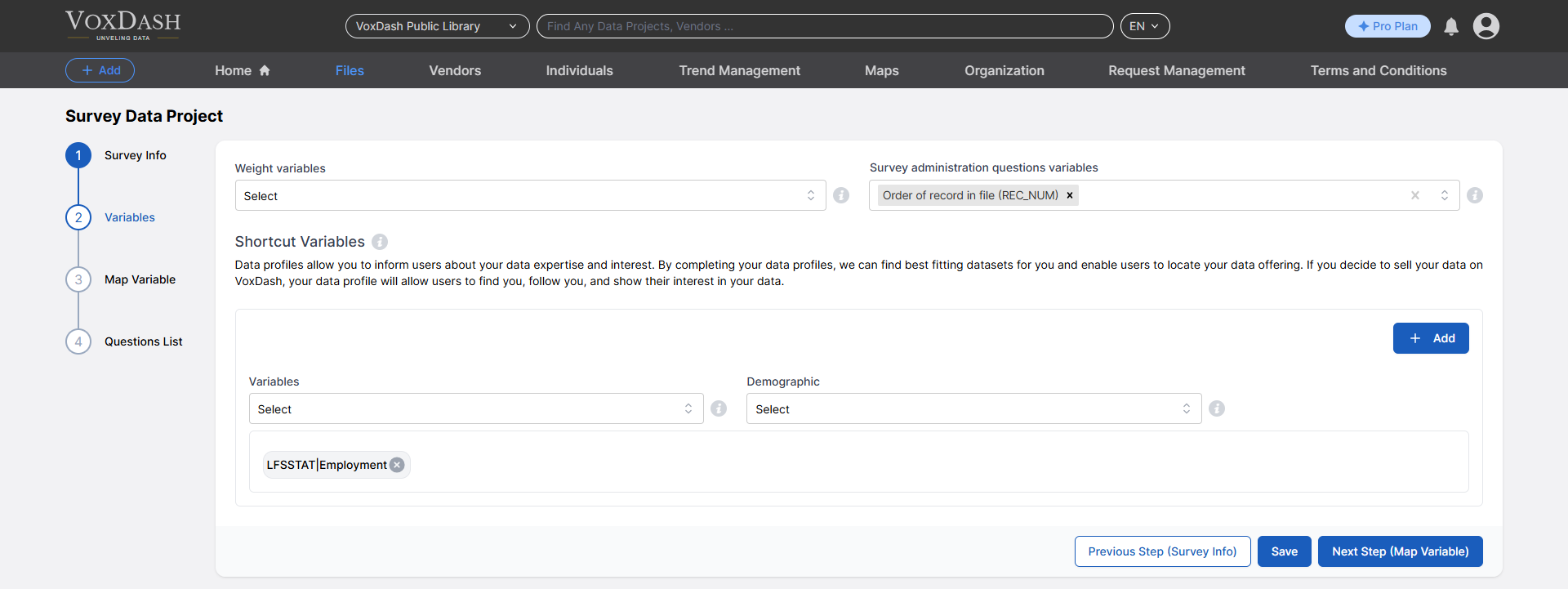
Wizard 2 (Variables)
- Weight variables: Indicate the variables used for weighting the survey data to ensure representative results or adjust for sample bias.
- Survey administration questions variables: Identify variables that are collected but will not be included in the analysis or reporting.
- Shortcut Variables: Define shortcut variables to quickly reference specific survey data points.
- Variables: Specify the variables included in your survey. These may represent the data points collected, such as responses to specific questions
- Demographic: List the demographic variables captured in your survey, such as age, gender, income level, or geographic location.
Wizard 3 (Map Variables)
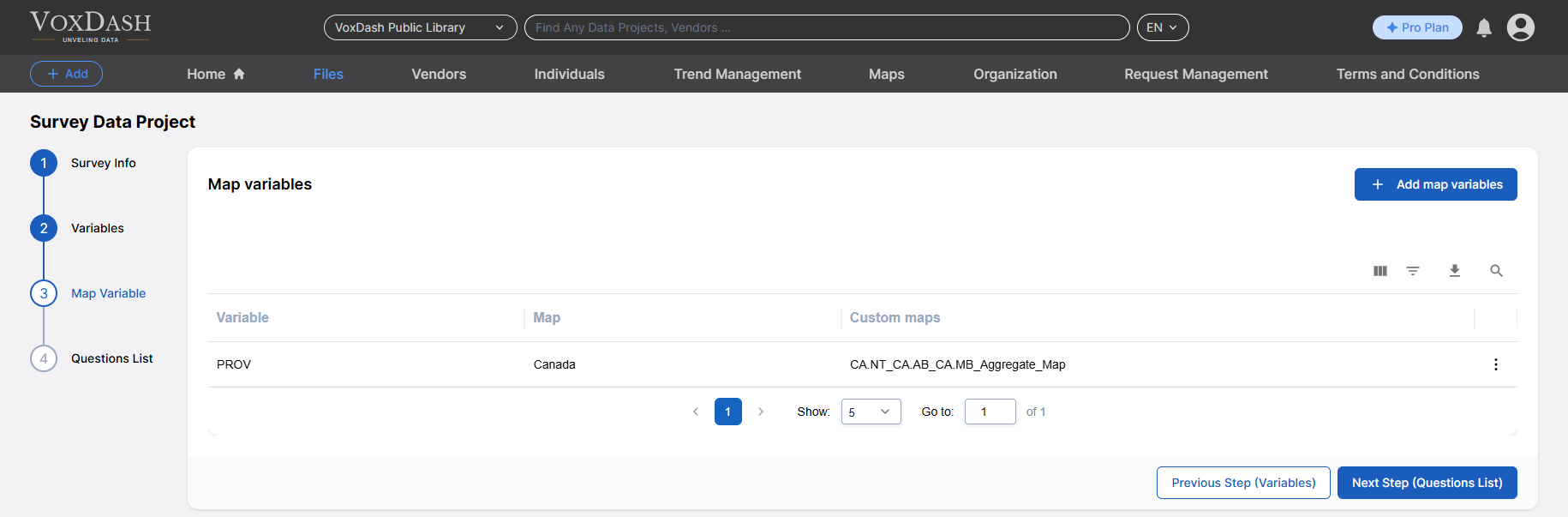
- Map Variables: Select the variables you want to map. These represent the data points or survey responses that will be linked to specific questions or categories.
- Map: Define how the selected variables are mapped to corresponding questions, categories, or values within the survey structure.