

- Awareness (what changed)
- Accountability (who triggered it)
- Traceability (when and where it happened)
- Actionability (what the user should do next, if anything)
Notification Delivery and Visibility
In-app notifications
- All notifications are surfaced through the bell icon in the main header.
- The bell icon displays an unread count badge.
- Clicking the bell opens a notification list, ordered by most recent first.
- Each notification item includes:
- Notification title
- Short description
- Timestamp
- Related object reference (project, file, task, subscription, etc.)
- Read / unread state
External notifications
Depending on user preferences and notification type, notifications may also be delivered via:- SMS
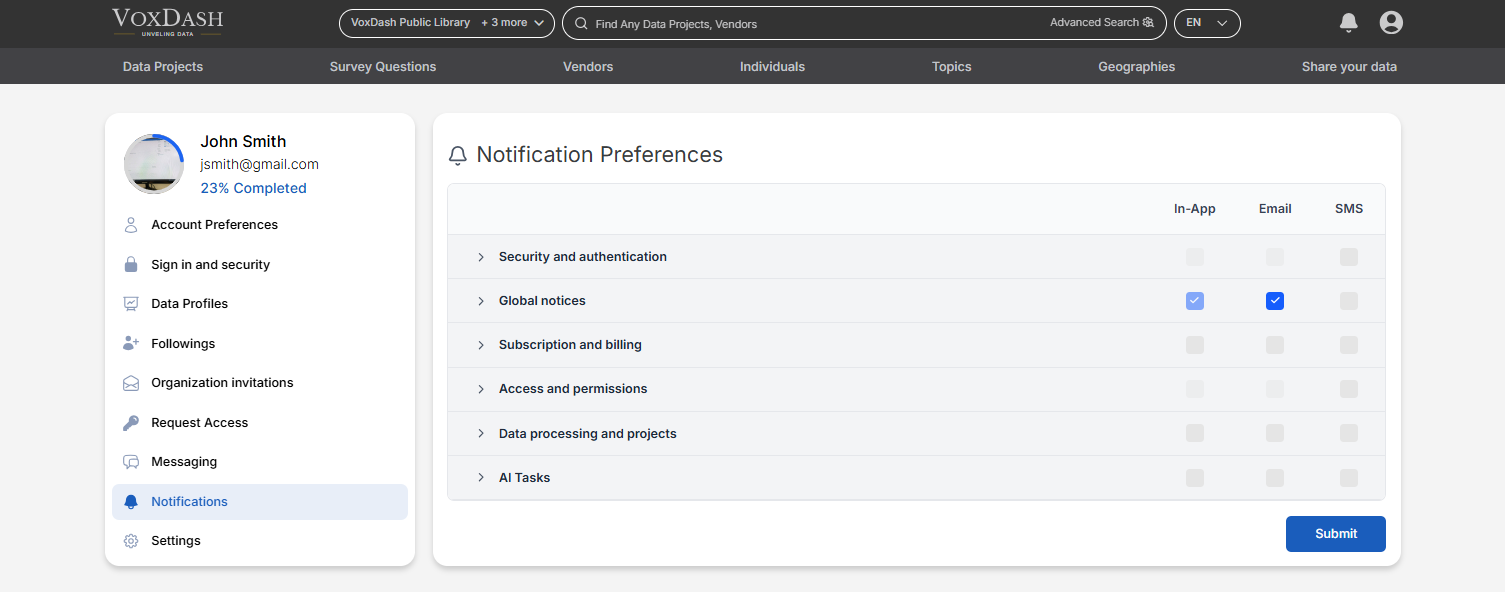
Notification Management
Users can manage notification preferences from Profile → Notifications. Configurable options include:- Enable or disable notification categories
- Choose delivery channels per category:
- In-app
- SMS
- Set frequency rules where applicable (immediate vs digest, if supported)
Mandatory notifications
Some notifications are mandatory and cannot be disabled or redirected. These are enforced to ensure platform integrity, security, and legal or operational compliance. Examples:- Global notices (in-app only)
- Critical security alerts
- Account integrity events
Types of Notifications
1. Security and Authentication
Triggered by events related to account access and security posture. Examples:- Login from a new device or location
- Password change
- Two-factor authentication events
- Failed login attempts
- Session termination due to security rules
2. Global Notices
Platform-wide announcements and system-level messages. Examples:- Scheduled maintenance
- Platform outages or degradations
- Policy or terms updates
- System-wide feature changes
3. Subscription and Billing
Related to plans, payments, and billing status. Examples:- Subscription upgrades or downgrades
- Payment success or failure
- Invoice generation
- Trial start or expiration
- Usage threshold warnings (if applicable)
- These notifications help prevent service disruption and billing disputes.
4. Access and Permissions
Triggered by changes in user access or authorization. Examples:- Access granted or revoked to a project, dataset, or file
- Role changes within an organization
- Approval or rejection of access requests
- Invitation to an organization or workspace
5. Data Processing and Projects
Related to data lifecycle events and project-level activity. Examples:- Project creation or deletion
- File upload, replacement, or removal
- Data processing started, completed, or failed
- Validation results available
- Metadata or schema changes
6. AI Tasks
Specific to AI-driven workflows and background tasks. Examples:- AI task started
- AI task completed successfully
- AI task failed or requires review
- Output ready for inspection or download
- Credit or usage-related AI events
- AI task notifications often include links to results or logs.