

What is a DOI?
A Digital Object Identifier (DOI) is a permanent, unique alphanumeric string assigned to a digital resource. It acts as a stable reference that allows users to reliably locate and cite content over time. DOIs are widely used across academic, research, and data-driven industries to identify:- Research papers and journal articles
- Datasets and data projects
- Technical reports and whitepapers
- Software and code repositories
- Industry standards and documentation
Why Use a DOI in VoxDash?
In VoxDash, assigning a DOI to your data project enhances its visibility, credibility, and accessibility. By generating a DOI, you can:- Make your project discoverable: Your project is added to the VoxDash public catalog
- Enable citation and sharing: Others can reference your project using a permanent identifier
- Improve data governance: DOIs help track and manage published datasets
- Support collaboration: Teams and external users can reliably access your work
Important Considerations Before Generating a DOI
Before assigning a DOI, review the following: Public Access Requirement Generating a DOI will automatically make your project public. This means:- All VoxDash users will be able to view your project
- The project will appear in the shared catalog
- Sensitive or proprietary data should be removed or anonymized
- Changes may impact users who rely on your dataset
- Version control becomes important for maintaining consistency
- A clear and descriptive title
- A detailed description of the dataset or analysis
- Relevant tags and categories
- Author or organization information
How to Generate a DOI for Your Project
Follow these step-by-step instructions:- Go to the Data Provider Section Log in to VoxDash and navigate to the Data Provider module from the main dashboard.
- Open the File Manager In the Data Provider section, locate the File Manager table where all your data projects are listed.
- Find Your Project Browse or search for the project you want to publish.
- Access the Project Menu Click the menu button (three-dot icon) next to the project name to open the action menu.
- Select “Generate DOI” From the options, click DOI to initiate the process.
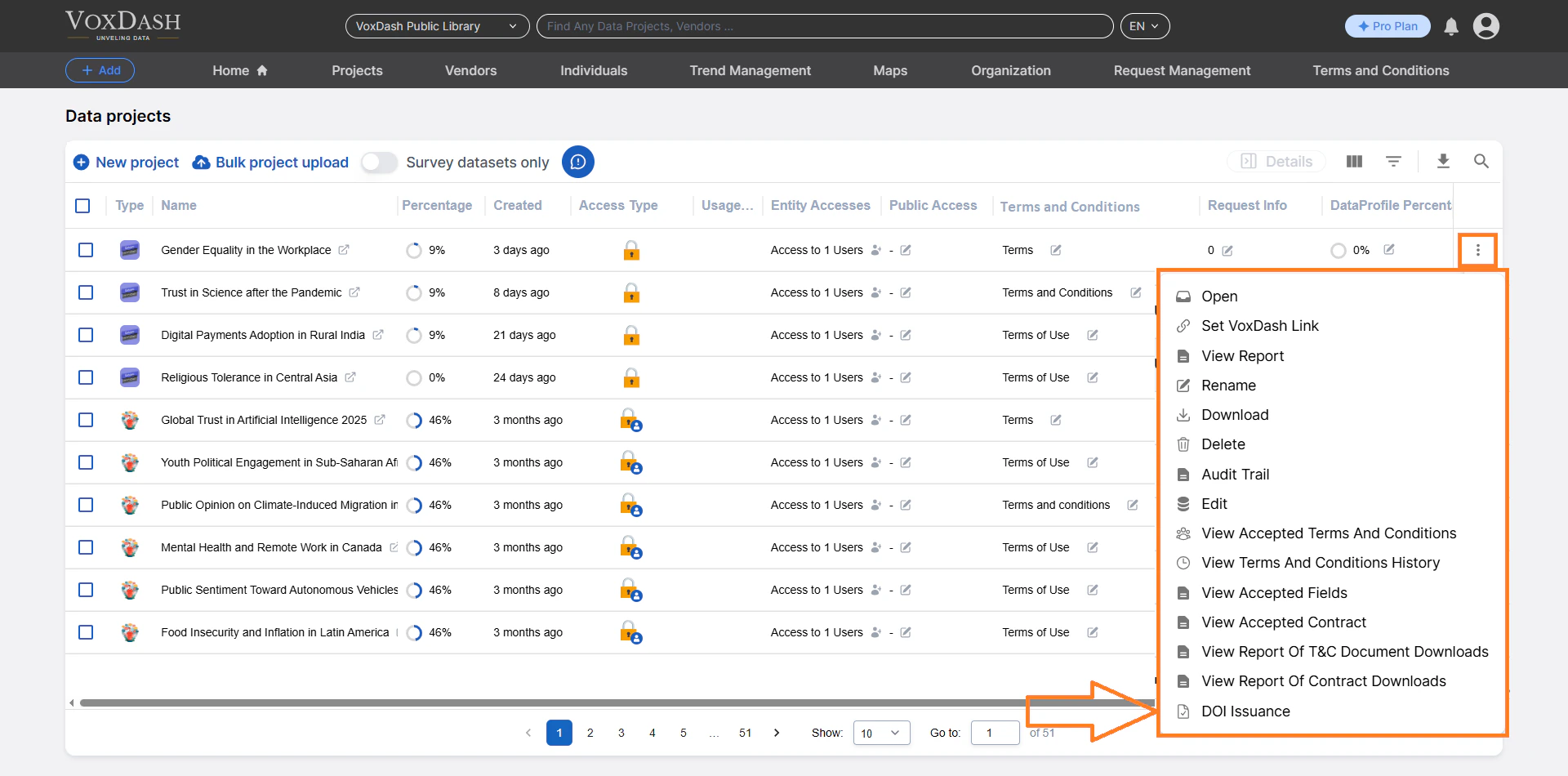
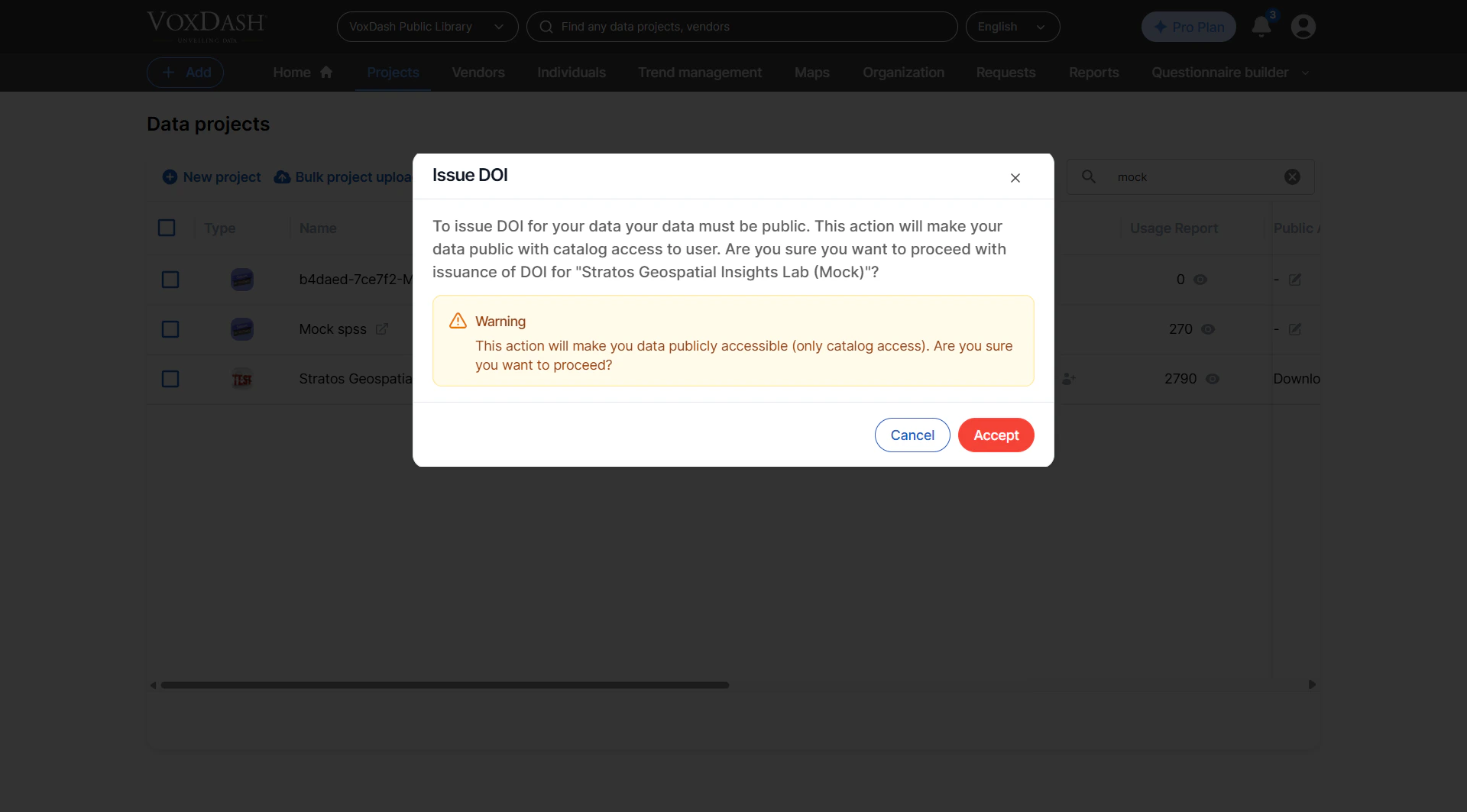
- Review Confirmation Prompt A confirmation dialog may appear. Carefully review the notice about public access and proceed if ready.
- Generate the DOI Confirm your selection. VoxDash will assign a unique DOI to your project and publish it to the catalog.
What Happens After DOI Generation?
Once a DOI is created:- Your project becomes publicly accessible
- A unique DOI link is generated for sharing and citation
- The project is indexed in the VoxDash catalog
- Other users can search, view, and reference your data
- Share the DOI in reports, dashboards, or external platforms
- Use it in documentation or academic-style citations
Best Practices
To get the most value from DOI-enabled projects:- Publish only high-quality, validated datasets
- Avoid including sensitive or confidential information
- Use clear naming conventions for projects
- Provide context so others can understand and reuse your data
- Share DOIs in internal and external communications to standardize references