

- Self-tests: the AI calls your own phone number, so you hear the interview exactly as a respondent would.
- Pre-tests: the AI dials a small number of real records from your cleaned sample, so you can check the questionnaire, voice and calling rules on real respondents before the production run.

The Tests tab is locked while the study is still a Draft. Finish setup first (see Cost and Review).
Self-test calls
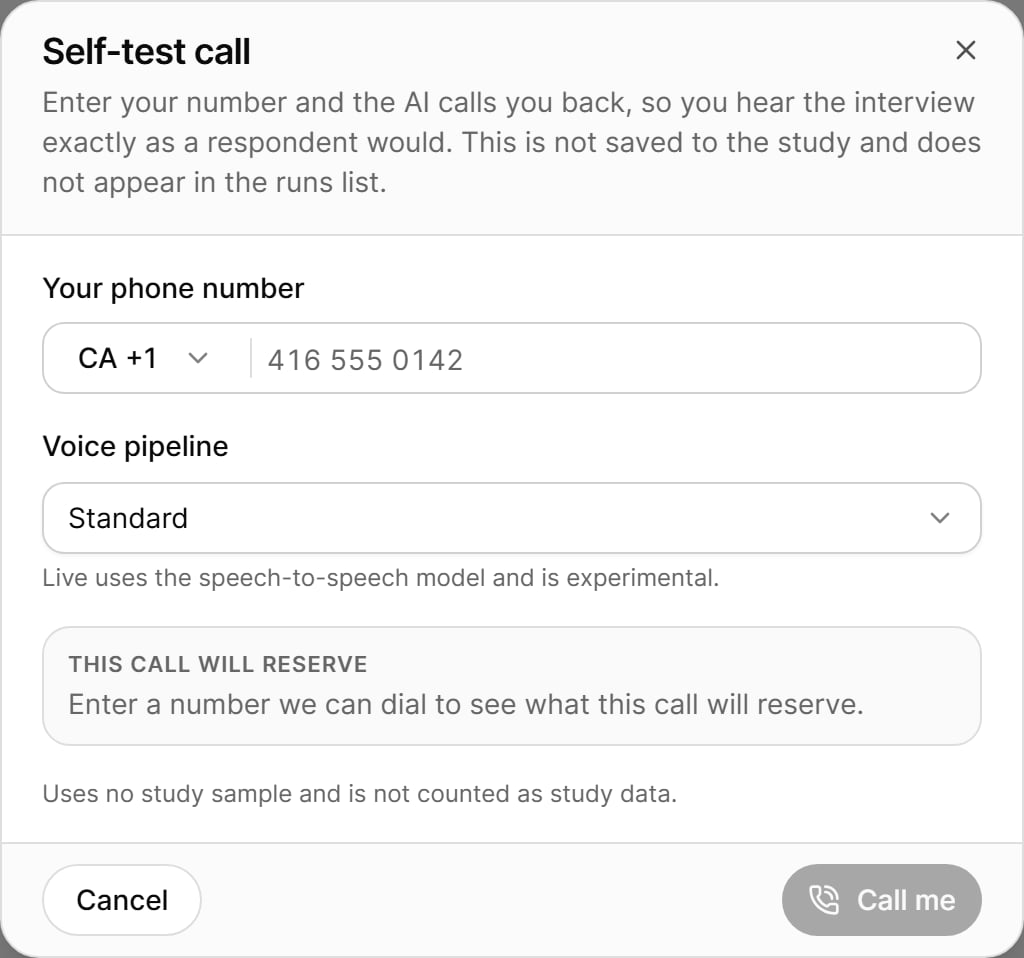
A self-test calls a phone number you enter, so you can hear the interview as a respondent would. It runs apart from the study and uses none of its sample, so it still works after the study’s sample has been used up.
Place a self-test call
1
Open the dialog
On the Tests tab, select Self-tests, then select Self-test call.
2
Enter your phone number
Choose the country code, then type Your phone number. The number must be complete for the selected country before you can call.
3
Choose the questionnaire version and voice pipeline
- Questionnaire version to hear: you can rehearse any version published for AI-CATI. This does not change the version the study is bound to in step 2.
- Voice pipeline: Standard (the default) or Live (speech-to-speech). Live uses the speech-to-speech model and is experimental.
4
Check the cost
The This call will reserve box shows the credit held for the call once a number has been entered. A self-test is charged like any other dial and takes nothing from the study sample.
5
Select Call me
Your phone rings shortly. A live panel follows the call until it ends.
Follow the call
While the call runs, the panel moves through these stages:
You can Hide the panel at any time. The call keeps going, and is still charged, after you hide it. Reopen it from the self-tests list (In call · open).
End a test call
Select End test call and choose how to end it:- Soft — let it finish: the interviewer finishes its turn, wraps up and hangs up. The report, recording and answers are kept. Any pending callback or retry is cancelled.
- Hard — cut it now: the interviewer reads a short closing line and the line drops immediately. There is no report, recording or answers from this call.
When a self-test cannot be placed
Self-test details
Each self-test in the list shows its run number, questionnaire version, phone number (masked), status, number of calls, duration and stop reason. Open one to see:- Run details: who started it, when, and with which questionnaire version.
- Call details: call count, disposition, duration, speech recognition (STT) confidence, median and 95th-percentile latency, the next attempt (a booked callback or an automatic retry, and its time window), plus the recording and transcript.
- Outcome: the answers captured on the call. A call that broke off part-way may have blank later questions, and a call where no interview took place has no answers.
Pre-tests
A pre-test dials a small subset of your cleaned sample and returns AI quality metrics you can review before launching the production run.
Start a pre-test
Select Start new pre-test. This opens the launch dialog in pre-test mode (see Launch and Readiness):1
Version
The pre-test rehearses the questionnaire version bound in step 2. To test a different version, re-bind it in step 2 first.
2
Records
Enter the Record count (the call cap). It must be a whole number between 1 and the number of free records. The dialog shows how many records have already been used in pre-tests and how many remain, and warns you when the count is large (more than 100 records, or more than 10% of the cleaned sample).
3
Readiness
A lighter set of checks than a full launch runs, enough to be confident the pre-test will run. Failing checks must be fixed before the pre-test can start; warnings and Not measured checks do not block.
4
Cost
The Estimated pre-test cost shows AI interviewing minutes, telephony minutes and the total, priced at one dial per record using the study’s own rates. Actuals settle when the run completes.
5
Start pre-test
Up to the chosen number of real calls are placed and charged.
- the study is not Ready to launch (pre-tests can only run before the main launch);
- another pre-test is dialling (only one runs at a time);
- there is no free sample left, because every callable record is held by a sub-sample or another campaign.
Pre-test runs list
Pre-test run page
Open a run to see:- Header: version, start and end time, and how many records were called, held and released back to the sample.
- Tiles: Completes, Resolved, Refusals, Partials, Non-contacts, STT confidence, Median latency and Cost so far.
- Outcomes in this run: each call counted under its outcome once it ends.
- Results grid: the same Per call and Per sample record views as the study’s Results tab, with search. Open a record to see its call history, recordings and answers.
Stop, resume or close a pre-test
If a pre-test stops because the AI credit ran out, a banner offers a Top up link to buy more credit (see Costs, Credits and Limits).
Best practices
- Make at least one self-test call in each interview language before launching, and listen for pronunciation and pacing.
- Run a pre-test on a small number of records to check real contact, completion and STT figures. Running a pre-test is advisory: readiness does not require it.
- Keep the pre-test small. Every record it calls is removed from the production run.