

Overview
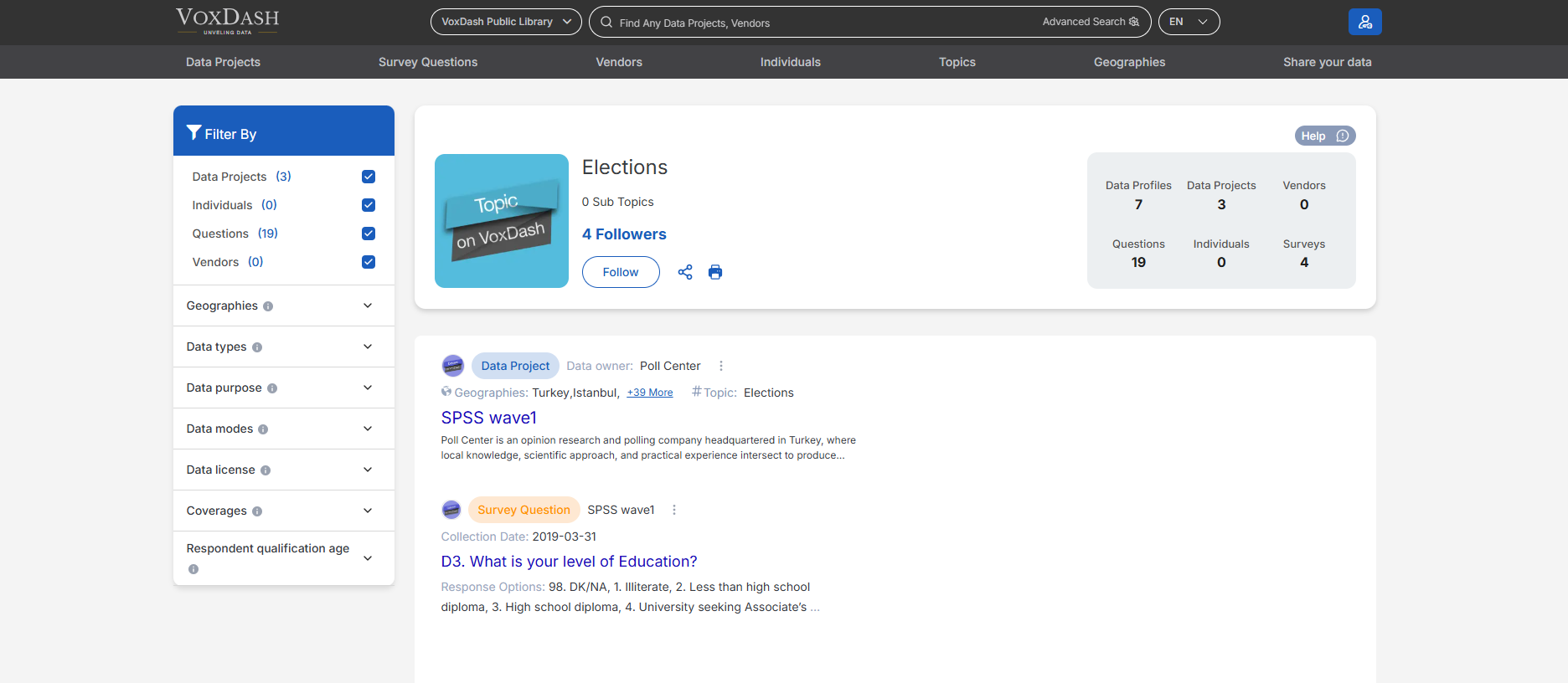
The Topic Page helps users understand how a specific topic is structured and where it is used within the platform. It connects related data assets and entities, enabling easier navigation, analysis, and discovery.Main Topic Information
At the top of the page, users can view:- The main topic name
- A brief overview or description (if available)
- The total number of related items linked to the topic This section provides a high-level understanding of the topic’s scope and relevance.
Connected Data Projects
This section lists all data projects associated with the selected topic. For each project, users can:- View the project name
- Access project details
- Understand how the topic is applied within the project
Connected Data Profiles
The Topic Page displays all data profiles linked to the topic. These profiles represent structured data entries where the topic has been applied during data entry. This helps users:- Identify patterns or trends related to the topic
- Explore detailed records associated with it
Vendors and Individuals
The page also shows a list of related vendors and individuals connected to the topic. This allows users to:- See which organizations or people are associated with the topic
- Understand stakeholder involvement
- Navigate directly to vendor or individual profile pages
Navigation and Discovery
By consolidating all related entities in one place, the Topic Page enables:- Faster navigation between related data
- Improved data discoverability
- Better contextual understanding of how a topic is used across VoxDash
Use Cases
The Topic Page is especially useful for:- Exploring all data linked to a specific subject area
- Conducting topic-based research or analysis
- Identifying active projects, contributors, and data profiles tied to a topic